Article
Spec-first, test-first: how I build AI systems with AI coding agents
Written plans, regression tests, agent reviews and checks against real APIs: how coding agents fit into my projects, and what I keep for myself.
 By Rounak Zoeb
Published Updated 12 min read
I use coding agents across most of my current projects. I set the direction and make the architectural decisions: what I want to build, what it needs to do and what it doesn’t. Then I plan the work, steer the agents while they implement it, review the changes and decide what ships. This is the workflow I’ve settled on, including the parts that still need my attention.
Most of the examples come from the doc-processing-toolkit, a Python framework for AI agents that I designed, built and maintain. It started as plumbing for document-processing agents and is now a general framework for building agents of many kinds. It gives applications one interface to models from Anthropic, OpenAI, Google and Fireworks, and handles the parts most agents need, such as cost tracking, connecting to tools through MCP servers (MCP, the Model Context Protocol, is a standard way to connect agents to tools), and keeping long conversations within a model’s limits. Its documentation site is public. Other examples come from doc-processing-std-tools, a library of MCP servers designed mainly to supply tools to agents built with the toolkit, and from my Japanese flashcard app.
I mainly use Claude Code for implementation and OpenAI Codex for review and critique, though Codex writes some code too. GitHub Copilot’s cloud agent often does a second review of the pull requests.
Setting up the repository
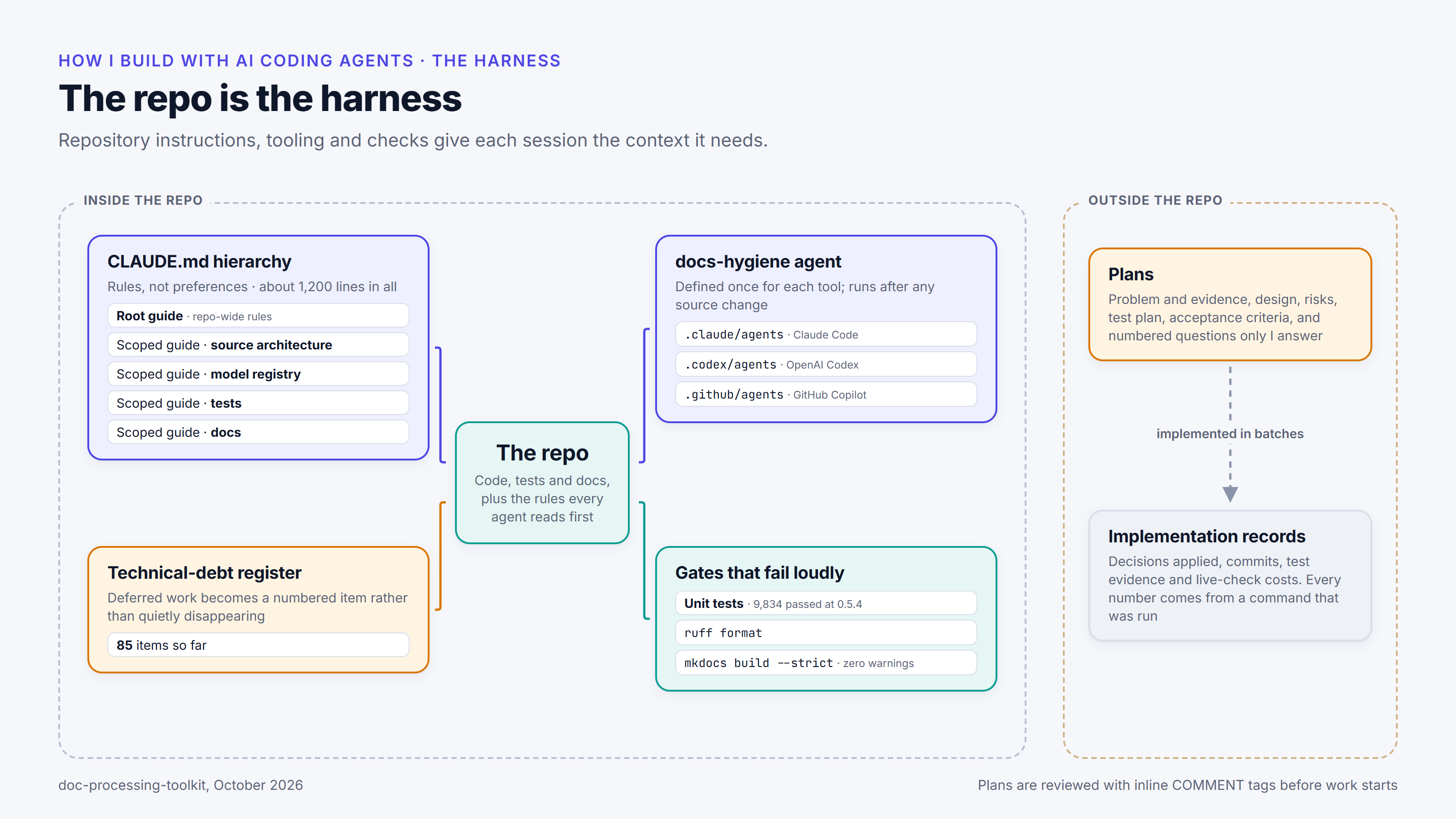
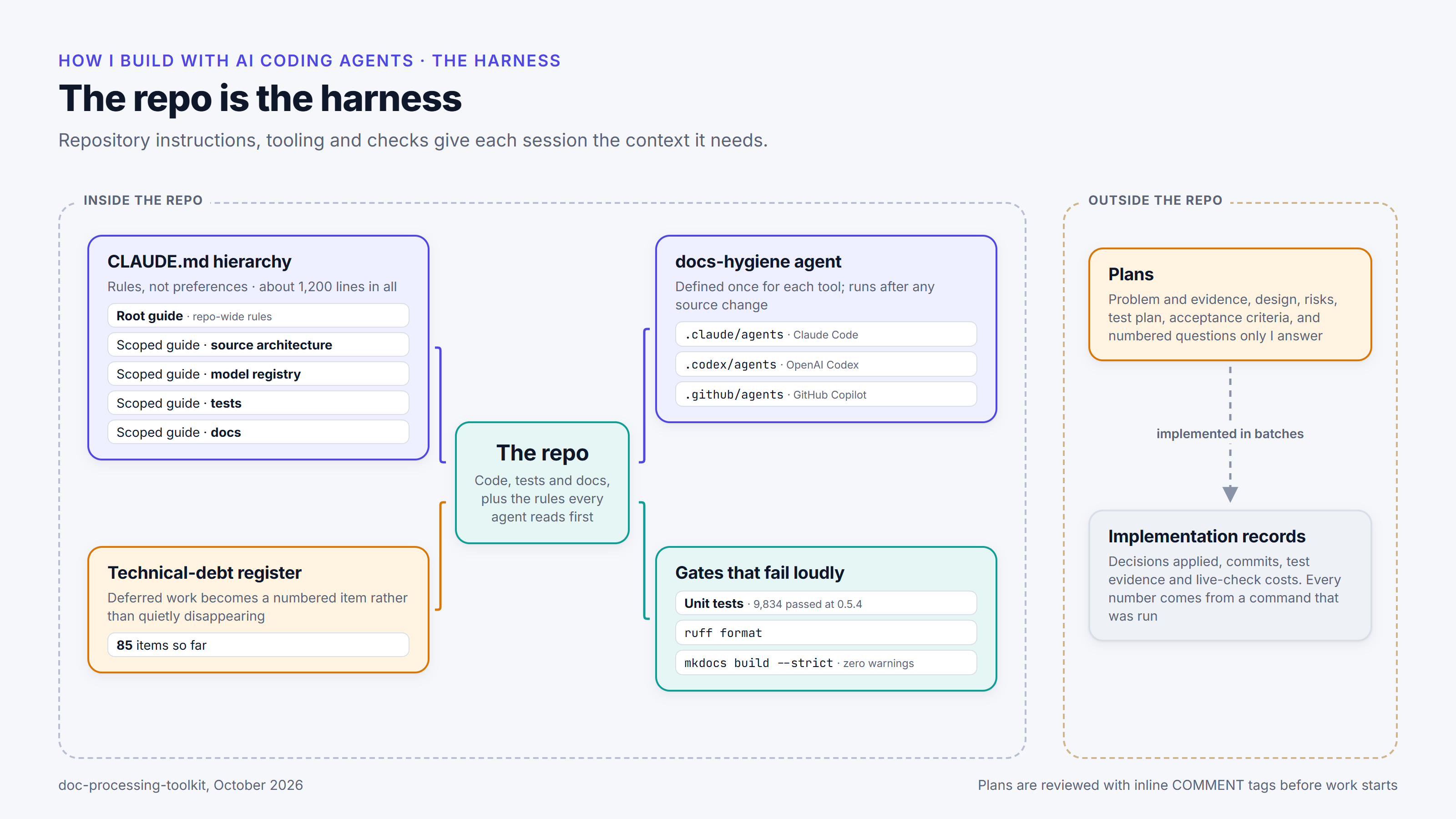
I think of the repository instructions, tooling and checks around the agents as a harness. Its job is to give each agent session the context it needs, so the result doesn’t depend entirely on what I remember to put in a prompt.
Most of my repositories have a set of instruction files, CLAUDE.md, which Claude Code reads; the other agents, Codex and GitHub Copilot, read the same files as AGENTS.md. In the toolkit there’s a main guide, plus separate guides for the code’s structure, the list of supported models, the tests and the documentation. The main guide is written as rules. A few of them:
Model additions are JSON-only.
Costs are billed per request and by served tier.
Cached tokens are a subset of input tokens.
A behaviour change a deployed client could notice ships with a kill switch.
Never push unless explicitly asked.
Stage an explicit file list. Never `git add -A` or `git add .`
In plain terms: adding a model means adding an entry to a data file, with no new code. Costs are worked out for each request, at the price tier the provider actually used, and cached input is counted within the input total. A change that an application already using the toolkit could notice comes with a kill switch: a setting that turns the new behaviour off again. Agents don’t push to the shared repository unless asked, and they commit only the files they changed, named one by one.
The last two exist because several agents can work in the same copy of the repository at once. Each one commits only its own files, and treats files it didn’t touch as someone else’s work in progress. Some rules come from incidents: one bans a particular git shortcut because it once quietly undid a feature that had already been committed.
I also use git worktrees a lot. A worktree is an extra working copy of the same repository, on its own branch, so agents working in separate worktrees can run at the same time without touching each other’s files.
The guides also record things about the design that aren’t obvious from the code. For example, the code that runs an agent’s back-and-forth with the model exists in four near-identical copies, one for each provider. So the guide says a change to it has to be made in all four; otherwise it would work with one provider and quietly not with the others. I’ve decided to merge the four copies later, and the guide says not to start that as a side effect of another task.
There is also a documentation agent, set up for each of the three tools. It started in February 2026 as a GitHub Copilot agent and was ported to Claude Code and Codex in April. After a code change, it checks that the descriptions in the code still match it, tidies the formatting, rebuilds the documentation site until it builds without warnings, regenerates the READMEs and the documentation bundle for AI tools, and runs the unit tests.
Work I decide to postpone goes into a numbered technical-debt register, a list of known shortcuts and deferred work, so nothing deferred gets lost.
Decisions go into the plan
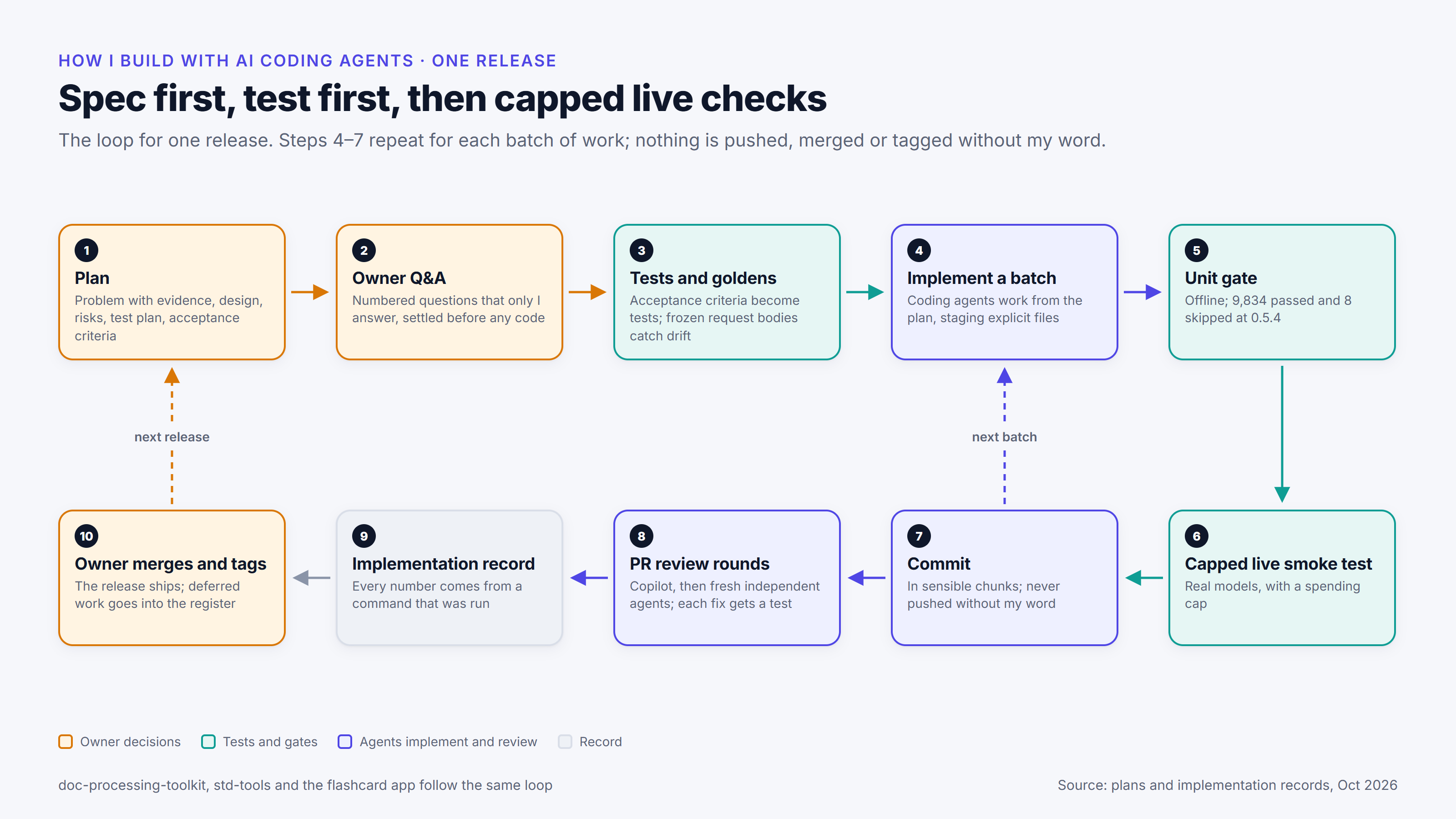
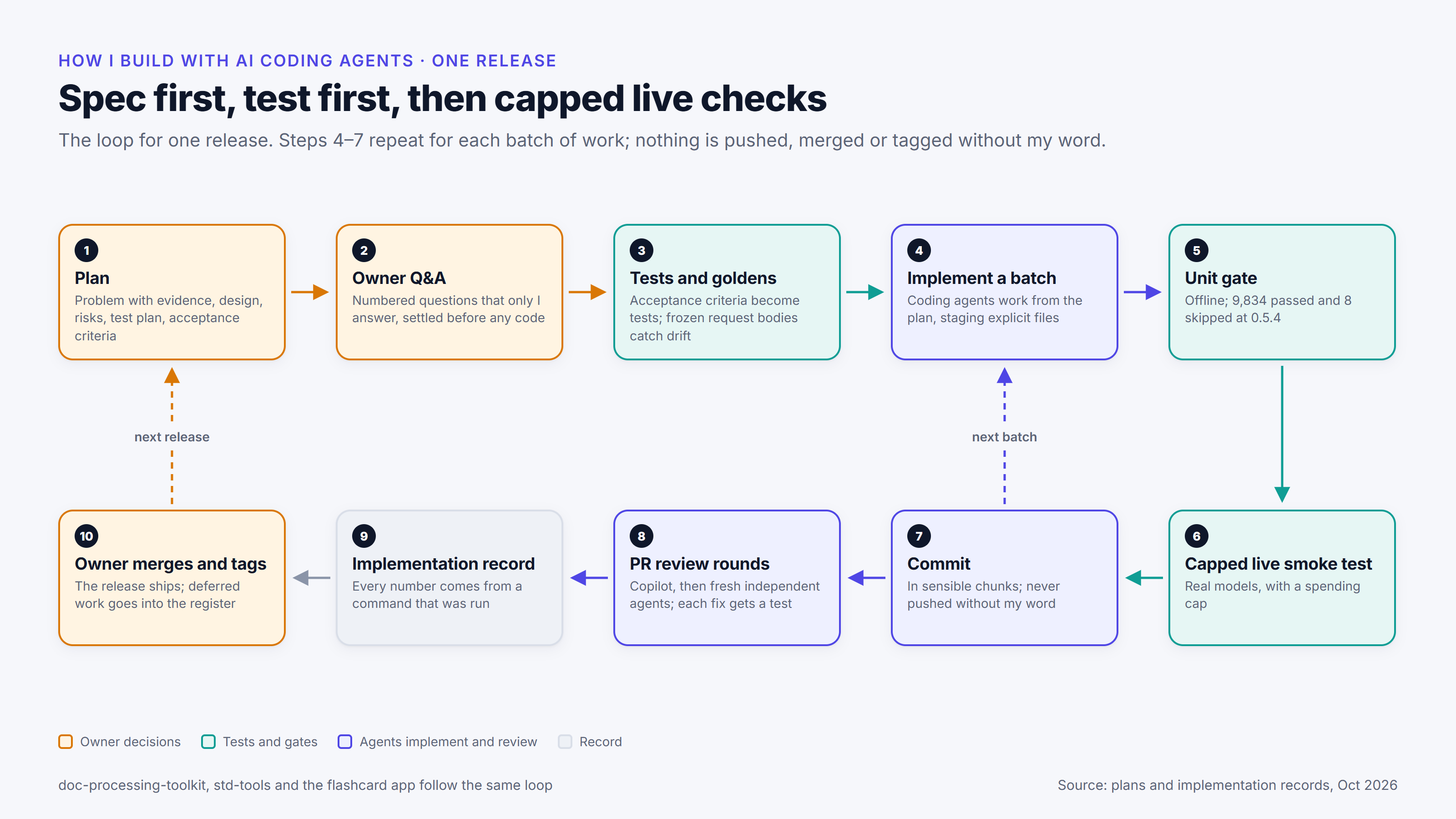
Larger pieces of work start with a written plan. I write the first draft, then work through it with an agent, usually Claude Code, until it’s final. I review each version by writing my comments into the file itself, inside HTML comment tags (<!-- … -->), and the agent revises the plan in response. That works better than describing the changes in a prompt: the agent can find every comment with a text search such as grep, and each comment sits beside the text it’s about, so the agent gets that context with it. For reviews of long content, where typing would take too long, I sometimes record my comments as audio and pass the recording to the agent, which transcribes it and acts on the comments. A plan sets out the problem and the evidence for it, the design, the parts of the code it changes, the risks, how it will be tested and how we’ll know it’s finished. It also lists the questions I need to answer before any code is written, and the agent has to bring me anything else it’s unsure of. Once the plan is final, the agent sets up a progress tracker, and the work is done in batches.
One example followed the cost problem described in The 6× gap. The fix changed how the toolkit receives a model’s response: as a stream, piece by piece, so a request that fails part-way still leaves a partial record of what it used. Before any code was written, the plan settled that streaming would always be on, with no setting to turn it off, and that alerts about high costs would be left to the applications built on the toolkit. It also came with written briefs for the sub-agents that did the work. A sub-agent is a separate agent session that the main session hands a task to.
I use sub-agents wherever it’s reasonable. Each one works in its own context (an agent session’s working memory), so the main agent, the one I’m working with, keeps its context for coordinating the work. I’ve also tried set-ups in which one agent is run over and over on the same task with no coordinator (the idea behind the “Ralph loop”), and built some custom GitHub Copilot agents to test it. I settled on one main agent coordinating as many sub-agents as the work needs. For large research tasks, Claude Code’s workflows have been very useful: the main agent writes the coordination of the other agents as a small program.
For one toolkit release (0.5.4), the plan went through several rounds of review, and my answers are kept in a table in the plan. For example, everything would ship as one release, the remaining security items would wait for the next one, and three corrections to the toolkit’s output would ship without kill switches.
The plan for my flashcard app listed my open questions, the things I’d already ruled out (so they wouldn’t be reopened), and fixed rules for the agent: don’t force-push (which can overwrite work already shared), don’t touch the file that holds the API keys, commit named files only, and stop at a spending limit. Rules like these can also be enforced with hooks: scripts that run automatically before or after the agent uses a tool. A hook that runs before an action can block it, so hooks can stop an agent reading certain files or taking certain actions.
I plan this way because an agent that meets an open question halfway through the work will usually pick a plausible answer and carry on, and that choice is easy to miss among many changed lines. Answering the questions first, and having the agent raise new ones, puts the decisions in writing, where I can check the result against them.
Tests that catch drift
Where it makes sense, I write tests before the code or alongside it, and I design them to fail when behaviour drifts: changes without anyone intending it.
For the streaming change, the first phase wrote 91 acceptance criteria (conditions the finished work has to meet) and 74 placeholder tests before any of the new code existed. Later phases replaced each placeholder with a real test.
Golden files are saved copies of exactly what the toolkit sends to a provider for a given model and set of options. The toolkit has 112 of them, holding more than 1,000 recorded requests, and any change to what it sends for an existing model makes a test fail and shows the difference. Before one larger change to the requests sent to Anthropic, a single commit saved the existing requests first, so the change could be checked against them. When the 0.5.4 release added a model, regenerating the golden files created nine new files and changed none of the existing ones. Keeping these recordings current is ongoing work, because providers change their APIs, and the recordings, along with the recorded responses the unit tests use, have to match what the providers currently accept and return.
Some tests name every model that has a particular capability. Adding Claude Haiku 5.5 made three of them fail until the new model was added to each list. That’s intended: the failure makes someone decide whether the new model belongs on each list. A similar test fails when a provider’s official Python library is at a new major version that hasn’t been tested with the toolkit, so an upgrade can’t slip through unchecked.
For a bug fix, I want a regression test that fails without the fix. If the test fails before the fix and passes after it, it really detects the bug, so it will catch the bug if it ever comes back. In the flashcard app’s review round (the full story is in Keeping an LLM app current), each of the five new tests failed without its fix and passed with it. On a doc-processing-std-tools release, an independent reviewer confirmed that eight new tests failed on the version before the fix.
The test guide records the unit-test result at each release. At doc-processing-toolkit 0.5.4, measured on 9 October 2026, the unit tests every change has to pass came to 9,834 passed and 8 skipped. A test can be marked to be skipped under certain conditions, for example when an optional dependency isn’t installed. The guide treats those 8 skips as the baseline and says a skip count well above it should be investigated, because it can mean tests are being quietly switched off.
These unit tests don’t contact any provider. They check the toolkit’s own logic, such as the requests it builds, the list of models and the cost calculations, using the golden files and recorded or made-up responses in place of the providers. How the providers actually respond is covered by the live tests, which make real API calls and are described below.
Implementation and review
The main agent (typically Claude Code for me) implements the plan in batches. Each batch follows the same order: implement, run the unit tests, run a quick live test against a real model, then commit. When the release is ready, the pull request goes through review.
The agents can call on each other. I’ve set up a skill for Claude Code that lets it talk to Codex, and a skill for Codex that lets it talk to Claude Code (a skill is a packaged set of instructions an agent loads when it needs them). Both can also ask GitHub Copilot’s review agent for a review, through Copilot’s command-line tool.
A separate agent (a Claude sub-agent, Codex or Copilot) reviews the pull request. Each finding is reproduced first, and then I decide whether to fix it, answer it or record it for later. On doc-processing-std-tools, Copilot found that a security check, which stops tools reaching private network addresses, relied on Python’s own list of reserved addresses, and on Python 3.10 that list treats some of them as public. The fix writes the official list into the code, so every Python version gives the same answer. Not every finding becomes a fix: one finding on the flashcard app was answered with a reason instead, because acting on it “would mean inventing numbers”.
I sometimes use Codex as a critic for Claude, and the other way round. In August I ran five Codex reviews of one release before it shipped: one of the whole release, and four of separate areas (the provider connections and cost calculations, the code that runs agents, new modules, and security). The fixes went into one commit; one of them restored charges for cached input that were lost when a request took a fallback route. The remaining findings were questions about the toolkit’s security assumptions, which went into the technical-debt register for me to decide.
On one doc-processing-std-tools release (0.6.1), three fresh agent sessions reviewed the changes one after another, without editing anything. The first found a way past the confirmation step that’s meant to stop an agent controlling the desktop without approval. The second checked the fix and found longer ways of writing the same input that still got through. The third reported the release ready to merge. Several rounds of review don’t prove the code is correct. Here, the gap in the first fix was found only because a second review tested it.
Documentation reviews sometimes find bugs in the code as well as out-of-date text. In September, one found that the toolkit’s figure for what retried requests cost had always been zero.
Checks against real APIs
The unit tests run offline. The live tests call the providers’ real APIs, through scripts that choose which models to test; testing every model on every run would cost 13 times as much.
I give live checks a budget for each project. The flashcard plan told the agent to stop and ask if the app’s cost readout went over US$2, or if any single run went over US$0.50. The app’s live API tests, including re-runs after the review fixes, cost US$0.32 in total. The doc-processing-toolkit 0.5.4 live checks cost about a dollar, itemised check by check in the release record. Those limits suit small projects like these. The part that carries over is setting a limit, and a point where the agent stops and asks, before it starts making paid calls.
Live checks find problems that mocks (made-up stand-ins for the provider APIs) can’t. The live checks for doc-processing-toolkit 0.5.4 found that Gemini’s image models return JPEG images, while the code saved every file as .png.
A check on 9 October 2026 sent a 60 MB clip inside a single request to Google’s gemini-nano-banana-2.1 model. Google’s file-input guide allows up to 100 MB sent this way (50 MB for PDFs), while the plan had assumed the 20 MB limit from older pages. The toolkit still switches to Google’s separate file-upload service above 20 MB, as a safety margin; its Multimedia docs describe how that works.
Another check, on claude-haiku-5-5 and also on 9 October, measured how the model counts tokens: the units providers bill by, and in which a model’s limits are measured. A 737,000-character prompt of repeated text, expected to come to about 101,000 tokens, came to 264,555, because the model counts that kind of repetitive text at about 2.8 characters per token. A prompt sized by its character count can therefore cost much more than planned, or not fit at all.
Implementation records
Each release ends with an implementation record: the decisions applied, the work on each item with its commits, test evidence, live checks with their cost, departures from the plan, issues found and follow-ups. Anything that wasn’t verified is marked “not verified”, so the record separates what was measured from what was assumed.
The records get corrected too. In one, a live check had counted a simulated key press as a success because the tool sending it reported success, although the key press had been ignored; after review, a corrected check watched for the key press itself. In another, a pull request description had overstated a check of the user interface, and the record notes the correction.
The final sign-off on the overall architecture and the code is mine.
What still needs my judgement
The agents write much of the code, and their reviews often raise design questions. The decisions are still mine. That starts with understanding what a client needs, setting the overall vision, and deciding what to prioritise and how things should work. With agents doing more of the implementation, that part of my role matters more than before. I don’t need to be able to explain every line of the code, but I do need to be able to explain how the system works and why I chose that design over the alternatives.
In the toolkit, the decisions cover the architecture: how each provider is connected, keeping the list of models as data, how each request’s cost is calculated, and where hooks and the shortening of long conversations plug in. They also cover scope: what goes into a release, what becomes a technical-debt item and what’s ruled out. For example, I put off moving to a new Gemini API, postponed two toolkit features (harness hooks and scheduled agents), and decided that streaming couldn’t be switched off.
Security trade-offs are mine as well. The toolkit’s MCP servers are designed to run on a machine the user trusts. I chose to document that limit, with a warning not to open the servers to untrusted clients, and left the product as it is. I also decide which findings block a release and which go into the register with an outline of the fix. A change that an application already using the toolkit could notice ships with a kill switch unless I waive it, and waivers are written into the changelog.
Some parts of the work haven’t become easier. Unclear requirements still depend on me noticing them before an agent settles them in a plausible but wrong direction, and a plan only covers the questions I think to ask. Judging review findings takes knowledge of the product, because a finding can be correct about the code and still be the wrong change to make. Realistic evaluation is hard to automate: the unit tests run against recorded and made-up responses, and the live checks are small, capped samples, so the token count and Google’s actual size limit only showed up against the real APIs. Fitting a change into the whole system needs care too, because a change that looks small can affect all four providers, applications already in use, or a security boundary.