MaintainedAI agents · Context engineering · Python
doc-processing-toolkit
A Python framework for AI agents, with tools, persistent sessions and cost tracking across multiple model providers.
5 min read
- model providers behind one Agent API
- 4
- models in the registry, as of v0.5.4 (October 2026)
- 107
- offline unit tests passing at the v0.5.4 release (October 2026)
- 9,834
Technology
- Python
- Pydantic
- MCP
- Anthropic API
- OpenAI API
- Google Gemini API
- Fireworks
- pytest
- MkDocs
Why I built it
The client projects I was working on kept needing the same plumbing: calls to several model providers, tools the model can call, structured output, streaming and some control over cost. Rebuilding that for each project was slow and easy to get wrong, so in October 2025 I started a framework of my own. It began with document processing, which is where the name comes from. It has since grown into a general framework for AI agents of many kinds, including document pipelines, research assistants, browser and desktop agents, voice sessions and multi-agent systems.
I could have used an off-the-shelf agent framework such as LangChain, but I chose to write my own. The providers’ own SDKs are direct and well documented, and with AI coding tools, writing the layer a project needs isn’t much effort. My own framework has only the code I use, and it changes only when I change it. That matters when paying clients depend on the software, because an update to a third-party framework can change how my code behaves. The toolkit’s dependencies are the providers’ SDKs and a few general-purpose libraries such as Pydantic.
Read the documentation. The documentation is public and the source is private. The toolkit isn’t published on PyPI. Applications install it from a private Git repository at a release tag. If you’re interested in finding out more, connect with me on LinkedIn (see Contact).
Providers, models and tools
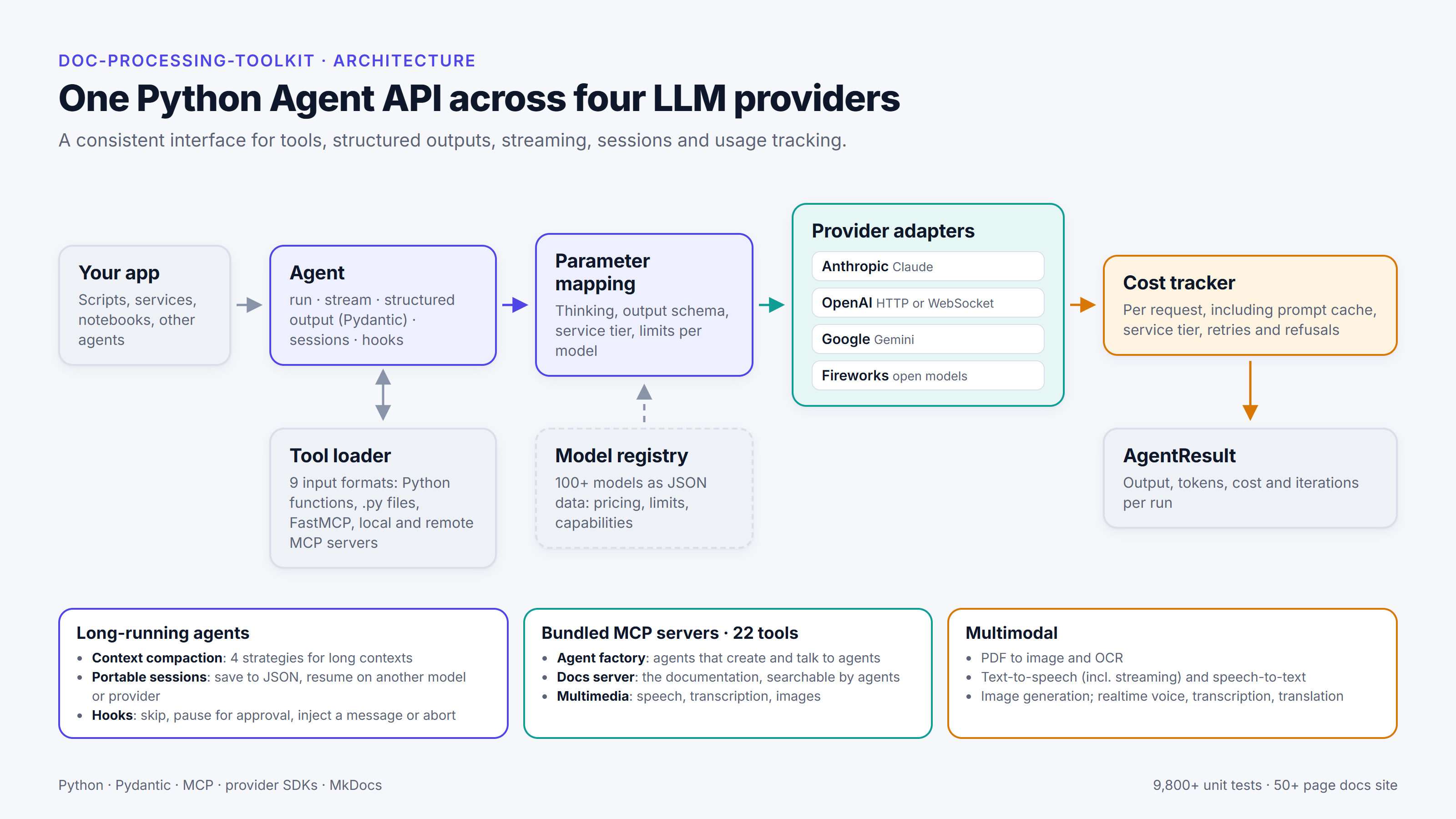
An application creates an Agent with a model name, instructions and a list of tools, then runs it with a message, either as a single call or as a stream. The result carries the output along with its token counts and cost. The same interface works across Anthropic, OpenAI, Google Gemini and Fireworks (which hosts open models). An application can change provider the way a car can take a different engine: the rest of the application stays as it is, and moving an agent to another provider is mostly a matter of changing the model name.
Behind the interface is a model registry, a JSON file that records each model’s pricing, limits and capabilities. As of v0.5.4 (October 2026) it lists 107 models, including image, speech and realtime models. Because the registry is data, most new models can be added without changing any code.
Tools can be supplied in nine input formats, from a plain Python function with a @tool decorator to local and remote MCP servers. MCP (Model Context Protocol) is an open standard for connecting AI applications to tools and data provided by separate servers. Structured output is validated with Pydantic on every provider, and streaming works the same way on all four.
The toolkit also covers multimodal work: converting PDFs to images, OCR, speech in and out, image generation and editing, and realtime voice sessions. It bundles a few MCP servers of its own, including an agent factory that lets one agent create and talk to another.
Sessions and approvals
Agents that run for a long time, or that click, type and browse, need somewhere to keep their state and clear points where an application can step in.
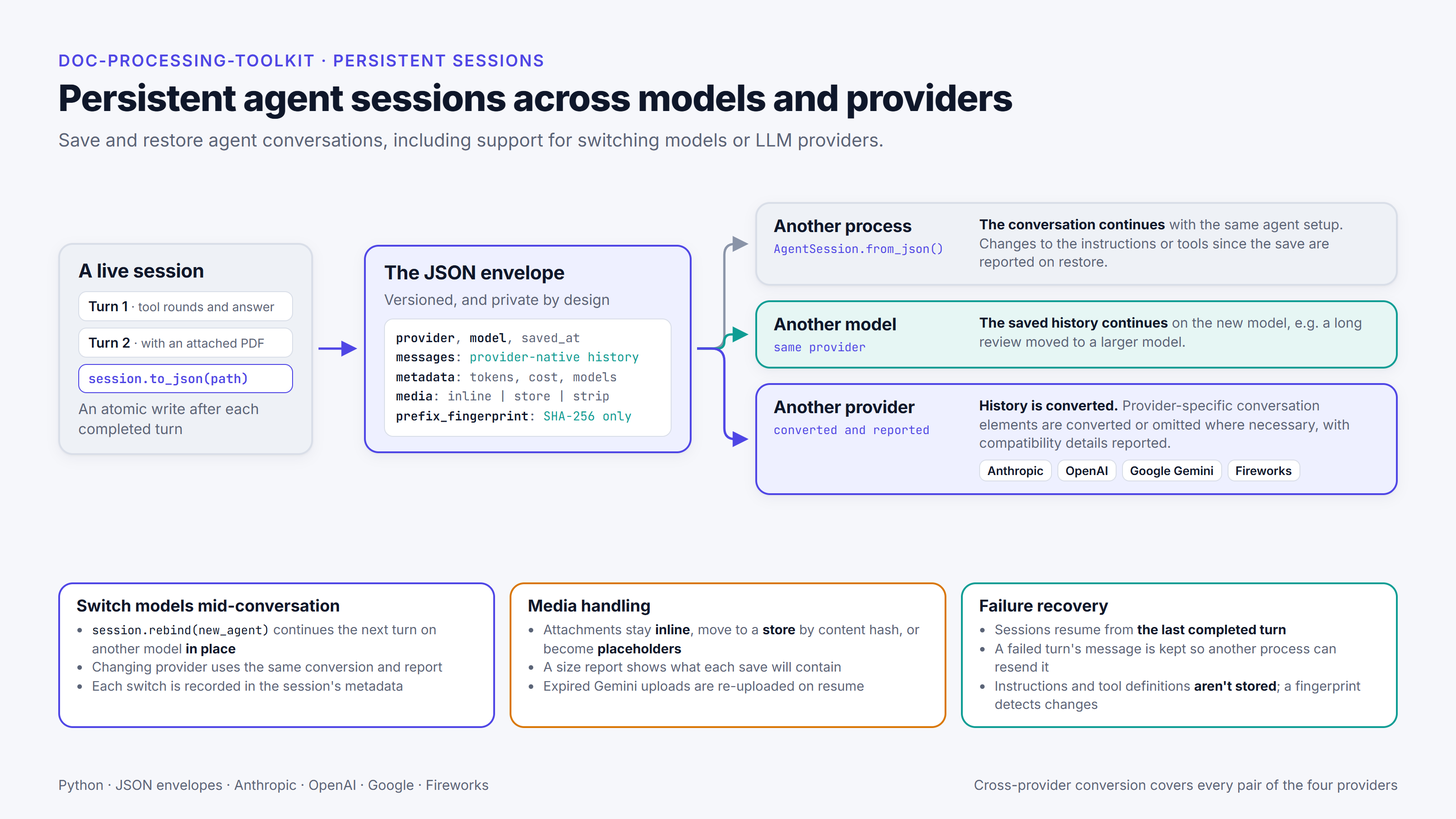
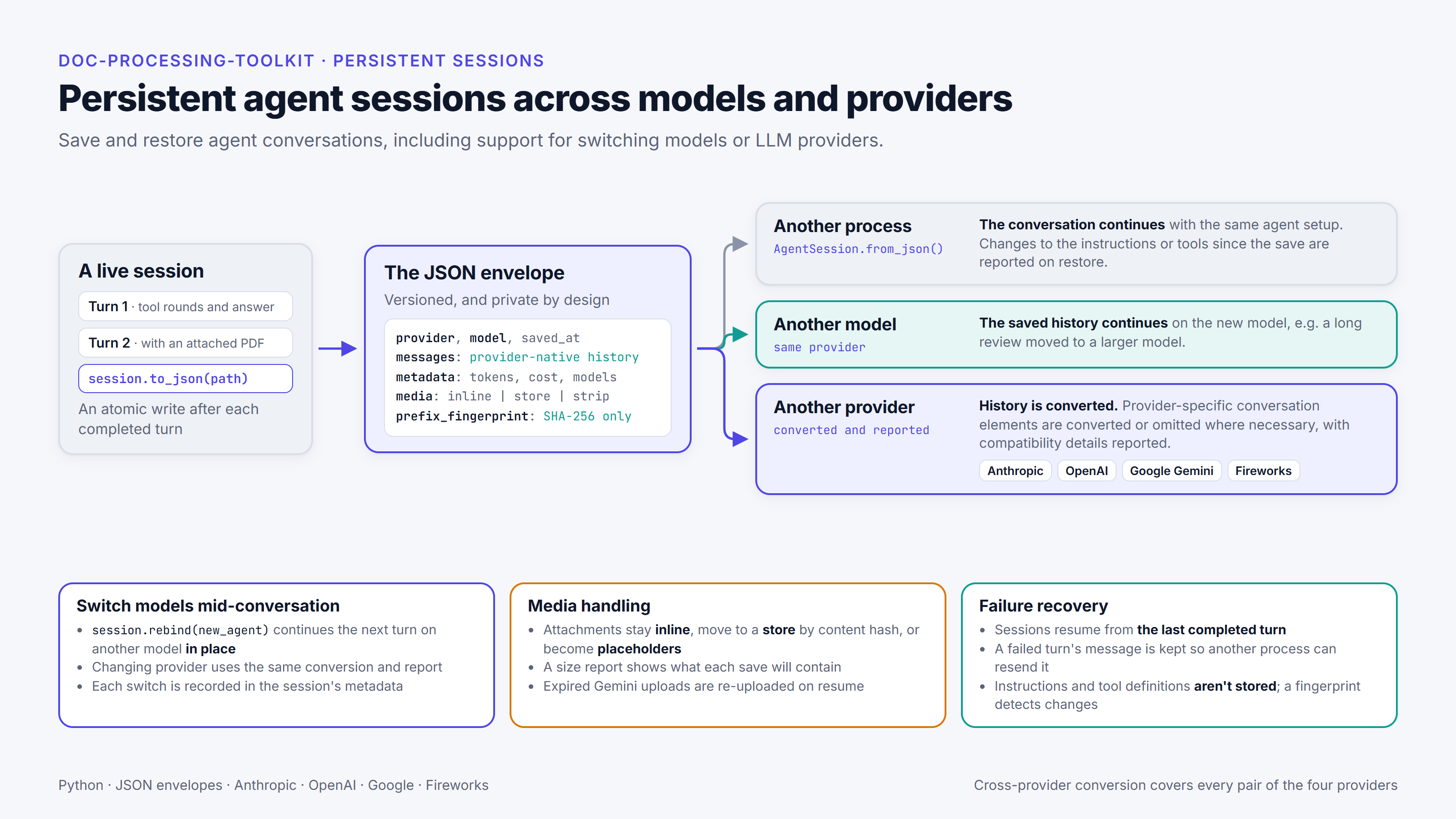
Long conversations can outgrow a model’s context window, so the toolkit has four compaction strategies that shorten the history before a call and between tool round trips. Sessions add persistence. A session is saved to JSON after each completed turn, so the conversation can continue later in another process, on another model or with a different provider. When it moves between providers, the toolkit converts the history and reports anything it couldn’t carry across.
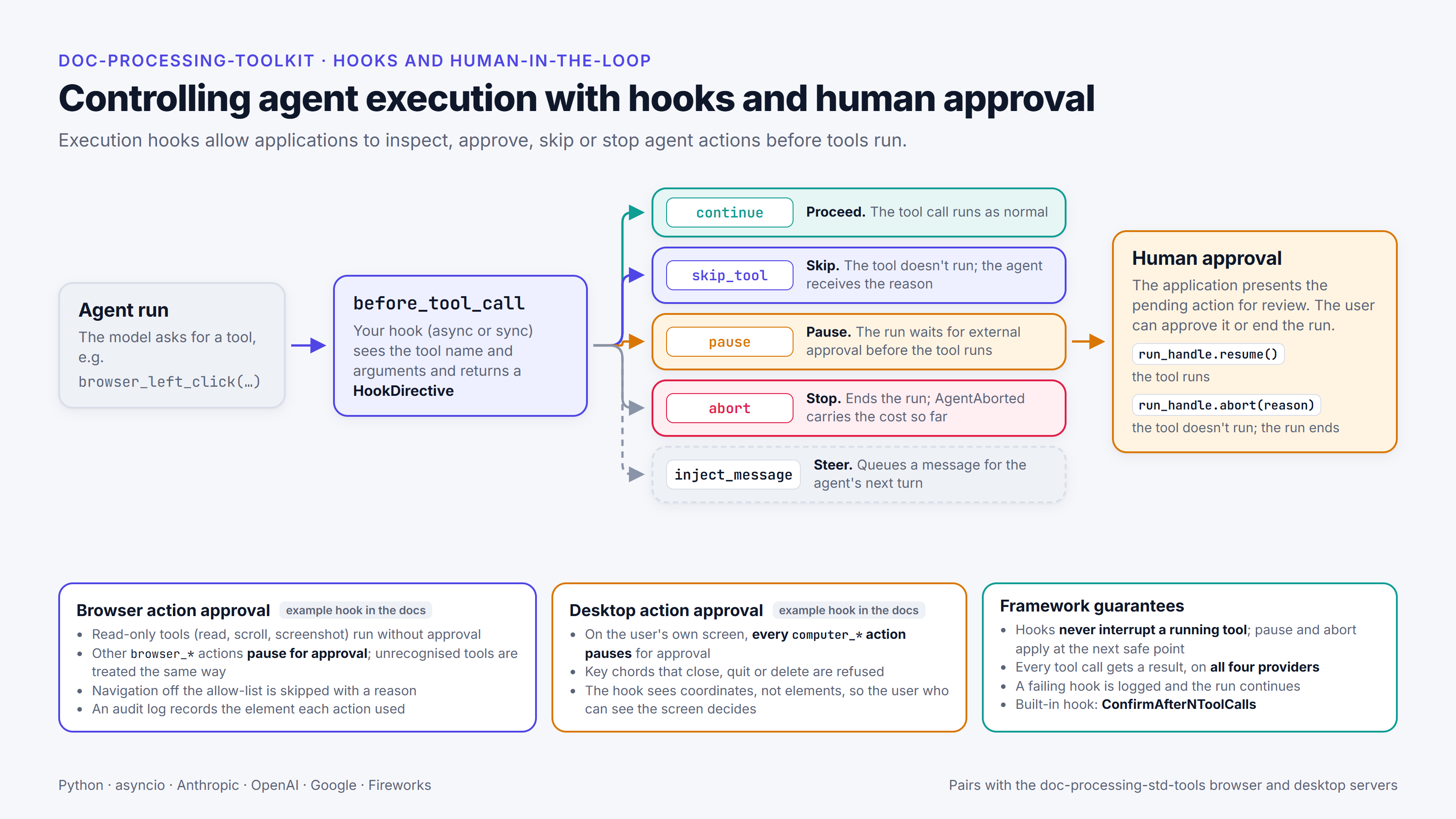
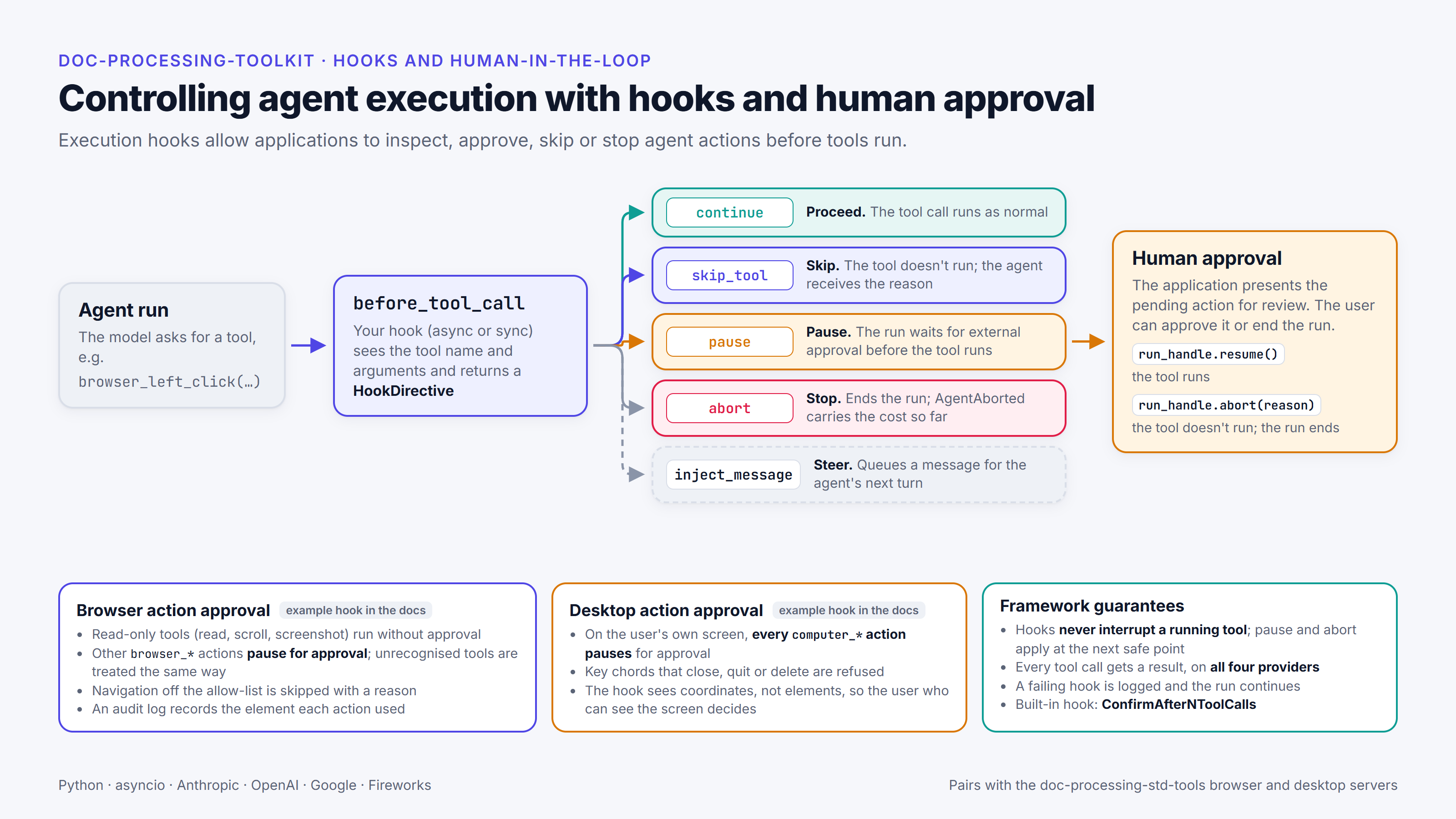
Execution hooks run before each tool call. A hook can let the call run, skip it with a reason the model reads, pause for a person’s approval, end the run, or queue a message for the agent’s next turn. The documentation includes example approval hooks for browser and desktop agents, which an application can adapt to its own policy. In the browser example, any action the hook doesn’t recognise waits for a person to approve it.
Cost tracking
I built cost tracking into the toolkit from the start. It records the cost of each request, including prompt caching, service tiers, retries and refusals. Providers count tokens in slightly different ways. For example, Gemini reports thinking tokens (the tokens a model uses to reason before it answers) separately, so they have to be added to the output tokens before the cost is worked out, while OpenAI and Anthropic already include them in the output count. Small differences like that are what make it hard to reconcile my own cost log with the bill.
In April 2026 the provider’s bill for a production job came to about six times what my cost log showed. The investigation pointed to requests that timed out during long runs and were then retried. The bill suggested those attempts had been charged, but they left no usage data behind, so my log didn’t record them. The main change that came out of it was streaming. I moved all four providers to streaming, so a request that fails or stops partway usually still leaves usage data and its cost is recorded, and long requests are less likely to hit idle timeouts. I also set explicit timeouts and started recording the cost of failed attempts. Over the following months I found and fixed further gaps in the accounting. When the toolkit has to estimate a cost, it marks the figure as an estimate.
The full story is in The 6× gap: reconciling an LLM cost log with the bill.
Where it’s used
The toolkit is the agent runtime of a bilingual AI document platform that I designed and built for a Japan-based client, which has been in production since June 2026. The research agent I built in 2025 ran on an early, project-specific version of it.
Together with doc-processing-std-tools, my separate library of MCP tool servers, it’s also the starting point for a personal AI platform I’m building with a co-developer. The platform is for agents that run longer tasks and build small apps, and its working title is AI App Builder.
How I build it
Each part of the toolkit starts with a specification. I write the first draft of the architecture and the overall design myself, then iterate on it with AI until it becomes a final specification in Markdown, which the tests and the implementation follow. At the moment that’s the most time-consuming part of the work. I also review the changes and decide what ships. I use coding agents for much of the implementation, testing and review: Claude Code does most of the implementation, OpenAI Codex works mainly as a critical reviewer, and GitHub Copilot reviews pull requests. Significant changes start as a written plan with acceptance criteria, and where it’s practical those criteria become tests before the code is written.
Golden files, which hold saved copies of the requests the toolkit sends to providers, catch unintended changes to what a model receives. As of v0.5.4 there are 112 golden files, holding more than 1,000 recorded request bodies. Before a release, the toolkit has to pass the offline unit tests (9,834 at v0.5.4), live integration and end-to-end suites, and live checks against real models with a spending cap. I wrote about the method in Spec-first, test-first: how I build AI systems with AI coding agents.
A small example
This is the tool example from the public quickstart:
from doc_processing_toolkit import Agent, tool

@tool
def add(a: int, b: int) -> int:
    return a + b

agent = Agent(
    model="gpt-6-luna",
    instructions="Use tools when needed.",
    tools=[add],
)

result = agent.run_sync("Add 7 and 8")
print(result.output)
The @tool decorator turns an ordinary Python function into a tool the model can call. To run the same agent on another provider, you would normally change only the model name. If you’d like a walkthrough or a live demo, get in touch.
More from the project