In productionDocument processing · AI agents · AI evaluation
Bilingual AI platform for document translation and creation
A Japanese–English platform I built for a client. It turns scanned engineering PDFs into editable Word, Excel and image files and drafts contractual documents.
7 min read
The source is private, but I'm happy to talk through how it works and show a demo.
- jobs run by the client's team, March–August 2026
- 300+
- pages processed in those jobs
- 7,000+
- my estimate of the team's productivity gain on most supported tasks
- 4–5×
- bilingual interface and in-app manual
- EN / JA
Technology
- React
- TypeScript
- FastAPI
- Python
- AWS
- DynamoDB
- Docker
- e2b sandboxes
- OnlyOffice
- MCP
- doc-processing-toolkit
- doc-processing-std-tools
What the client needed
The client is a Japanese consultancy. Part of its work is helping Japanese construction companies bid for and deliver overseas projects and projects for foreign clients, including the US military. That work comes with a heavy load of documentation in Japanese and English, and a language barrier for the construction companies, so the consultancy helps them with much of it. Its small team was translating and preparing documents by hand, including technical manuals, specifications, spreadsheets and drawings, often from scanned PDFs. They also prepared contractual documents from a mix of sources.
They wanted the work to go faster, within a few firm requirements. The team corrects the translations, so the outputs had to stay editable; a flattened, translated PDF would have been no use to them. Someone on the team still needed to check each page, in either language. The cost of each job also had to be visible, because the client uses those figures for invoicing and cost tracking.
How the team uses it
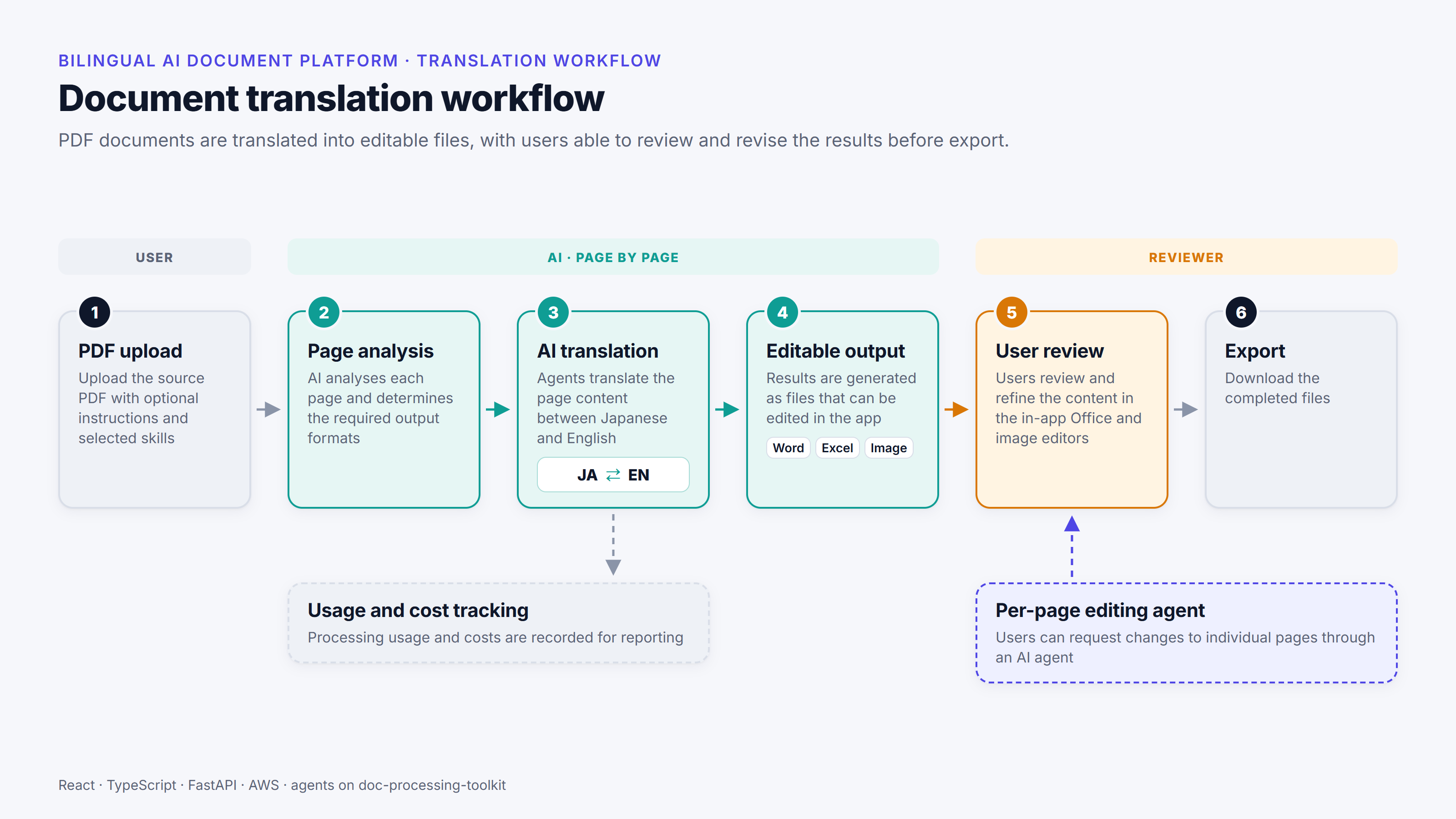
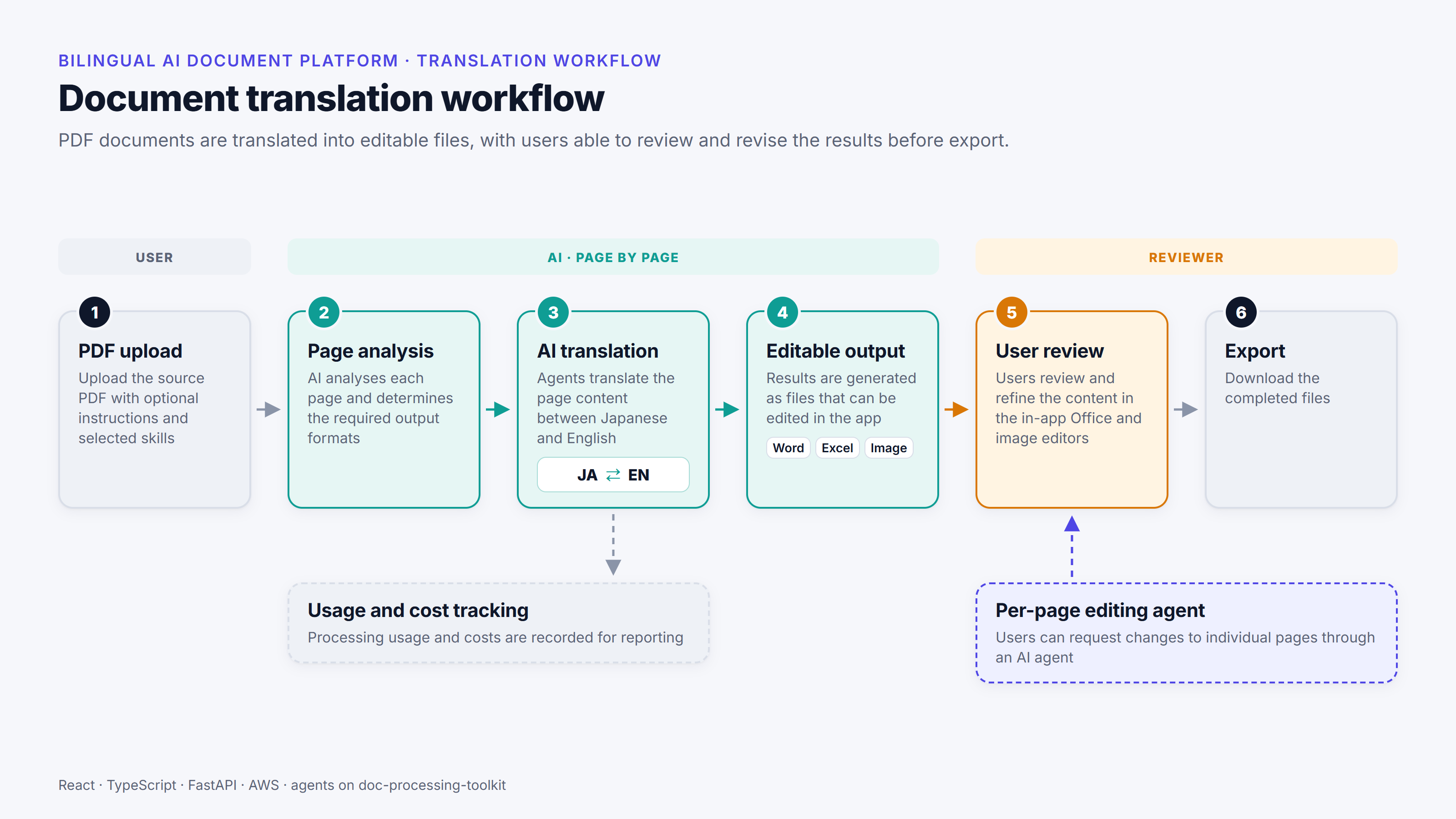
The platform has two main workflows. The first is translation. A user starts a job by uploading PDFs, choosing the direction (Japanese to English, the default, or English to Japanese) and adding any instructions. A job can take several PDFs, so there’s no practical limit on the number of pages. Scanned pages are rendered as images for an AI model that can read them, so they need no separate text-recognition (OCR) step.
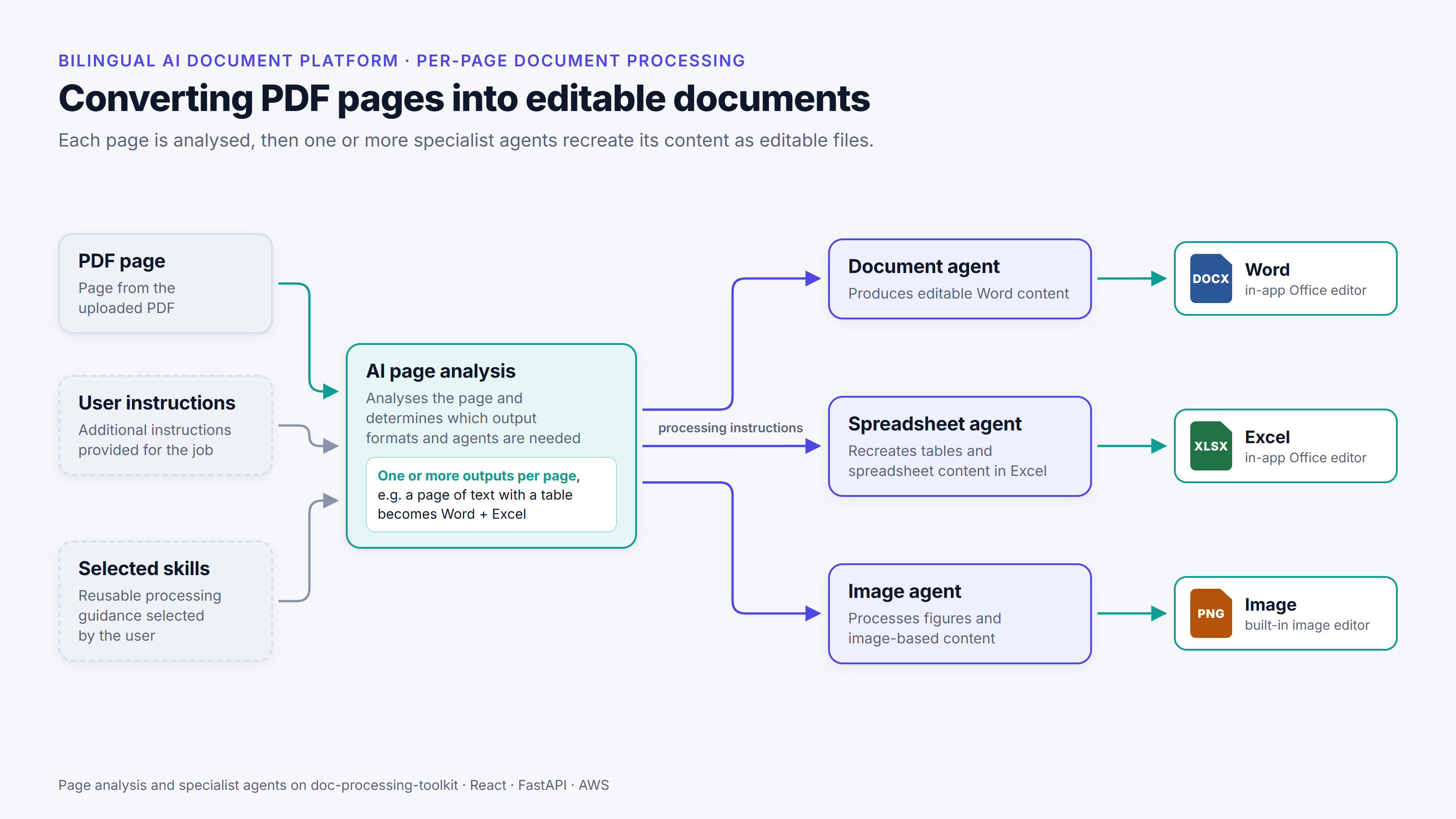
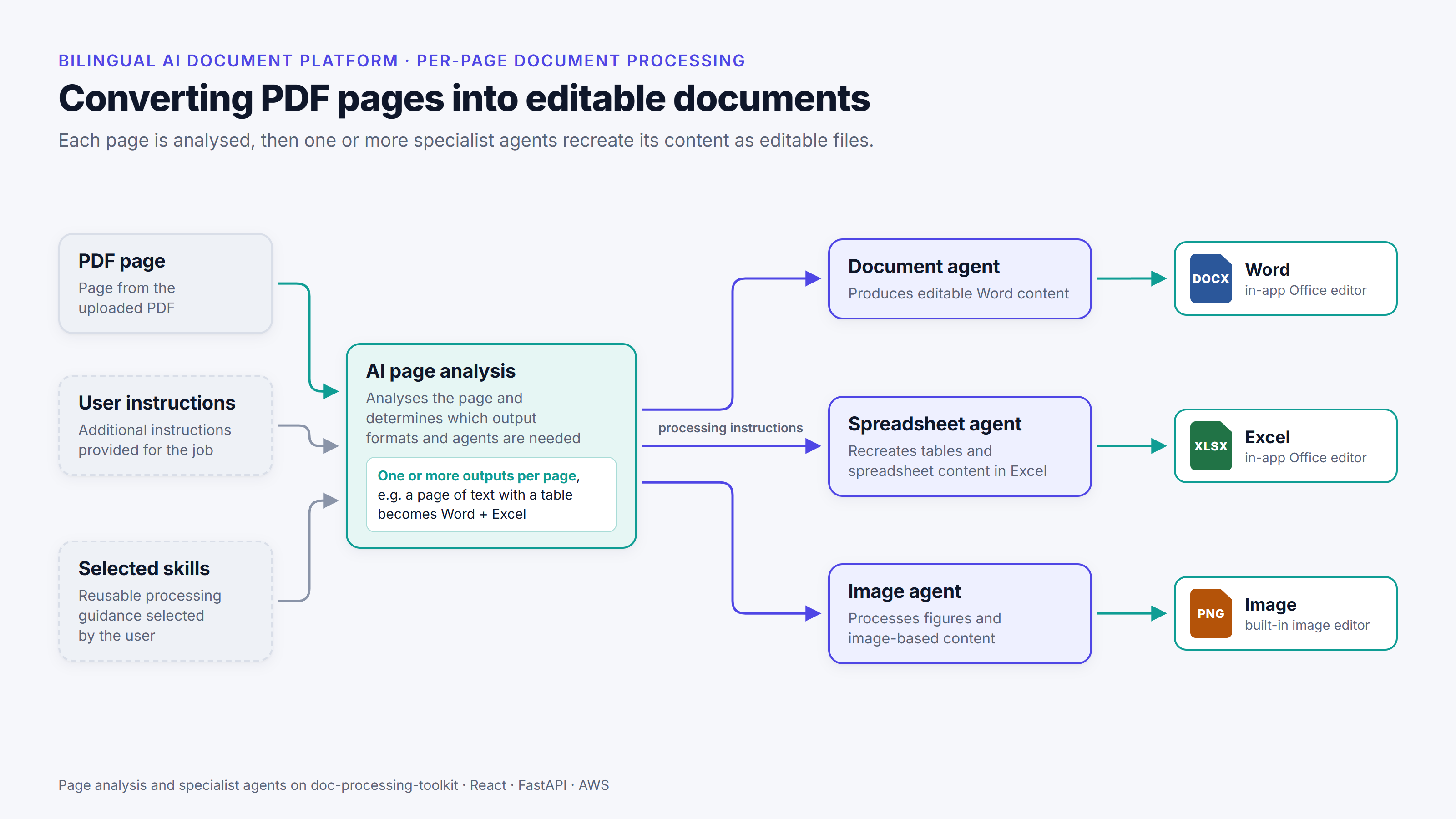
The platform analyses each page and decides which outputs it needs: a Word document, an Excel spreadsheet, an image, or more than one of these. A specialist agent for each type recreates the page in that format and translates it. Pages can be processed in parallel, in batches of a configurable size: with batches of 50, a 50-page document takes about as long as a two-page one. That’s how the team has been able to put thousands of pages through it.
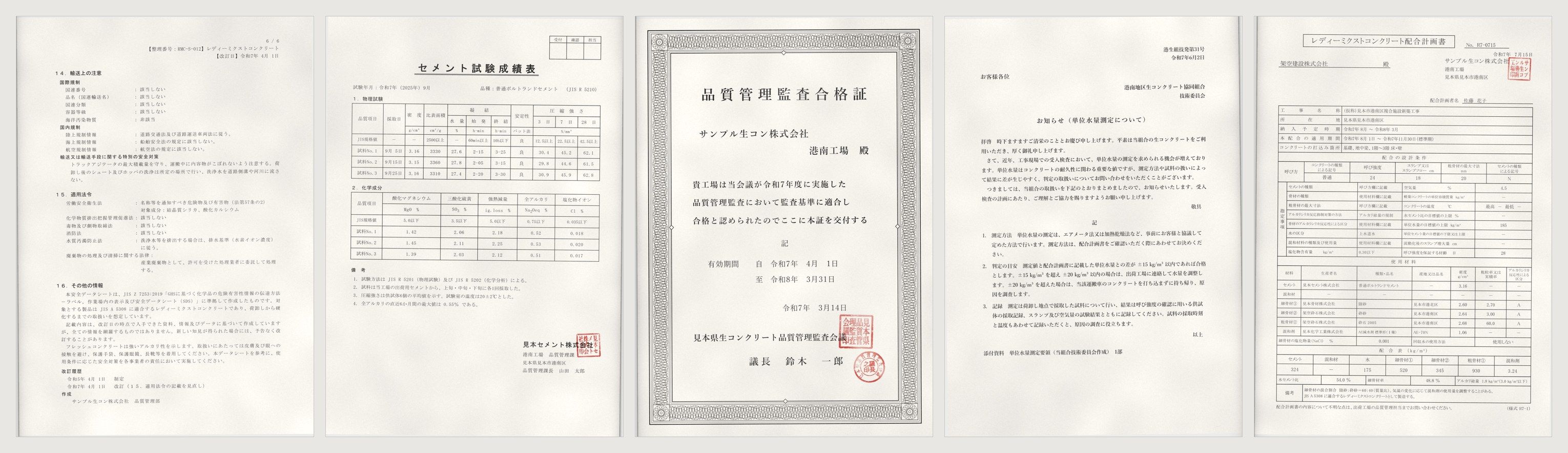
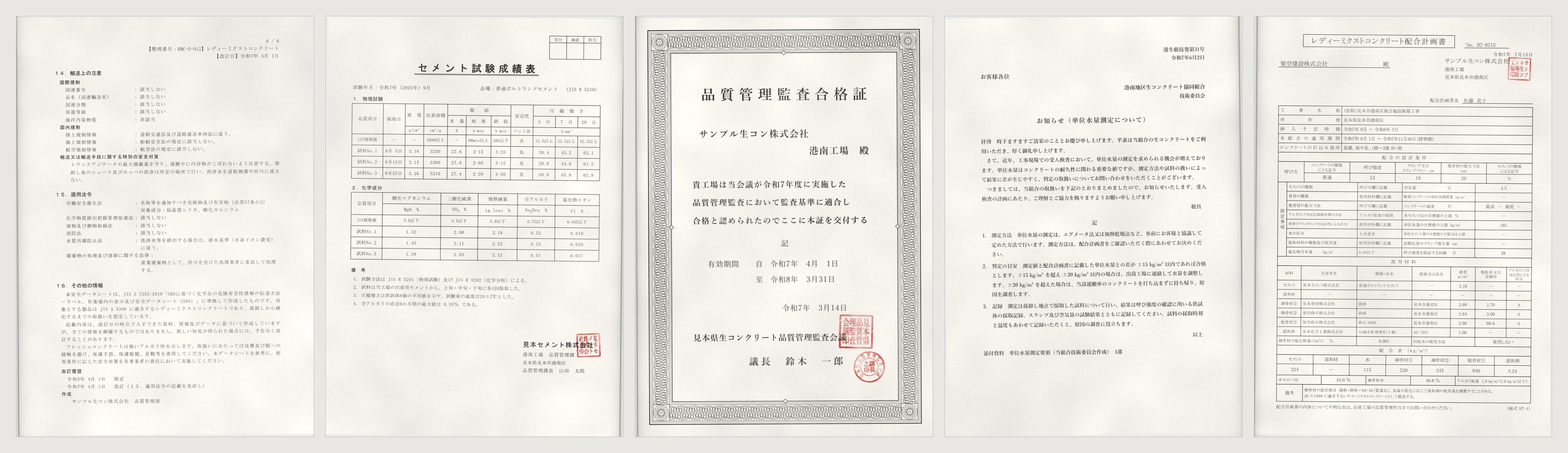
The user’s instructions add to the agents’ own judgement, and so do skills. A skill, in this sense, is a packaged set of instructions for the agents; users write and edit skills in the app and choose which ones each job uses.
The user then reviews the results in a side-by-side viewer, with the original page on the left and the translated Word, Excel or image output on the right. When a page has more than one output, each has its own numbered tab. Word and Excel outputs open in OnlyOffice, an office editor built into the platform, where several people can edit at once. Images open in an image editor, where the user can add text and boxes or replace the image.
A user can correct a page by hand or ask the in-app editing agent to change it. They can show the agent what they mean by attaching screenshots with notes on them, or by clicking on the part of the page they want changed, and they can also give it data files and skills. The agent works on one output at a time in its own isolated cloud environment, and each change it makes becomes a new version that the user can choose to keep. When the pages are ready, the user exports them as editable files in each output’s own format, or as a PDF of the translation, on its own or alongside the original pages.
What the recording shows
- Create a job: Japanese to English, a model and its reasoning level, Fast Mode on, and the job's house rules in the additional instructions.
- Select the five-page sample PDF and start the translation.
- When the pages are done, open the results. Page 1 is a Word output, shown beside the original page.
- In the built-in Word editor, reword a line of section 15 to "Dispose of as industrial waste through a licensed waste disposal contractor." and save it.
- Open the in-app editing agent, attach a screenshot of the original page and draw a box round section 15.
- Send: "In the section I've boxed in red (15, Regulatory Information), set out the laws as a two-column table: the law on the left and what applies on the right, one row per law. Keep the wording as it is."
- Check the agent's version, with section 15 as a table, and keep it.
- Export the Word pages as a single file and open it in Word.
What the recording shows
- Open page 2, the cement test results, as an Excel output.
- In the built-in spreadsheet editor, change cell A9 to "JIS requirement" and save it.
- Ask the in-app editing agent: "In the physical tests table, add an 'Average' row under Sample No. 3. Use AVERAGE formulas for the numeric columns, with the same decimal places as the values above. Leave the date, setting-time and soundness cells empty."
- Check the new row in the agent's version and keep it.
What the recording shows
- Open page 3, the certificate, as an image output.
- In the image editor, add the text "Translation for reference only" and save it.
- Ask the in-app editing agent: "The council's name at the bottom runs into the red seal. Wrap it onto two lines so both seals are fully visible, and keep the chair's name below it."
- Check the agent's version and keep it.
The second workflow is preparing contractual documents. An agent drafts them from a mix of PDF, Office and image sources. It plans its work as a to-do list, runs up to three sub-agents at once, and can produce Word, Excel and PowerPoint files, PDFs, text or images. It attaches citations that point to a specific place in a source, such as a page and line range, a sheet and cell range, or a section. In the drafting view, the chat with the agent is on the left and the draft on the right. Clicking a citation opens the source beside the draft and highlights the cited page, lines, cells or section, so a reviewer can check each statement against the original. Every saved draft is kept as a version.
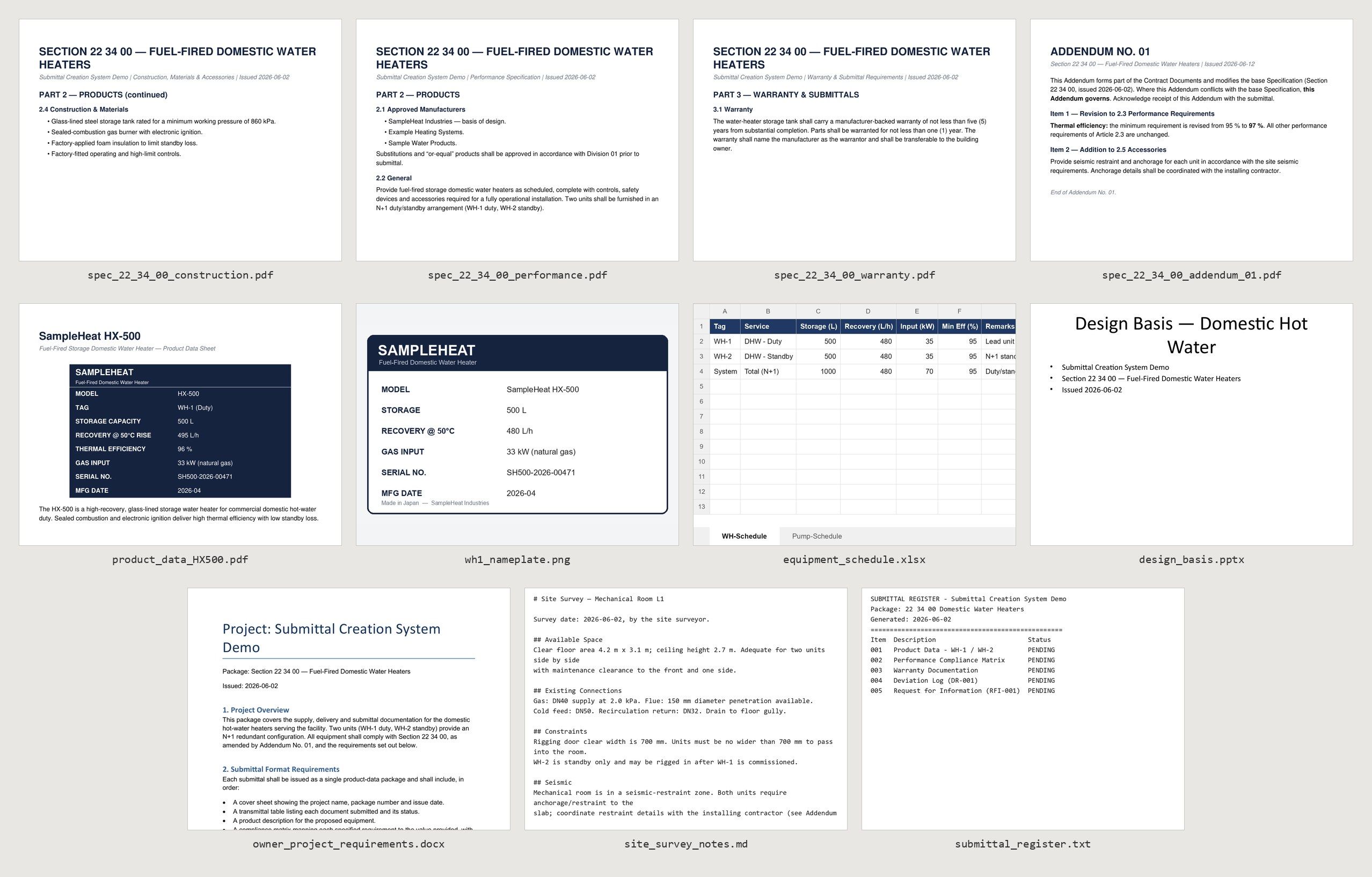
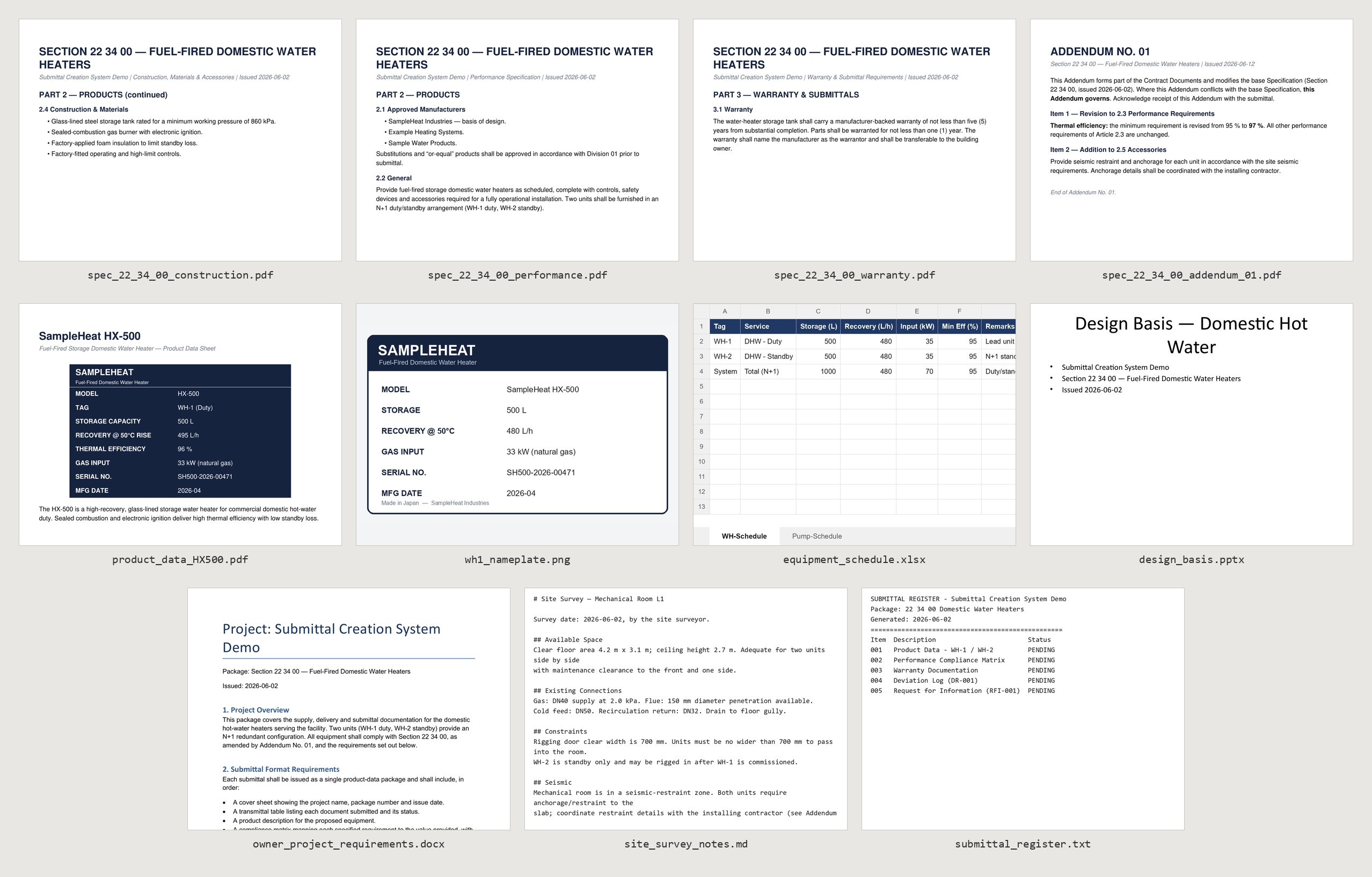
The recording below asks the agent for a product-data submittal: the documents a contractor sends to show that the equipment it proposes meets the specification. The agent works from 11 sample source files for a pair of water heaters, from the specification and an addendum to it to the site survey notes.
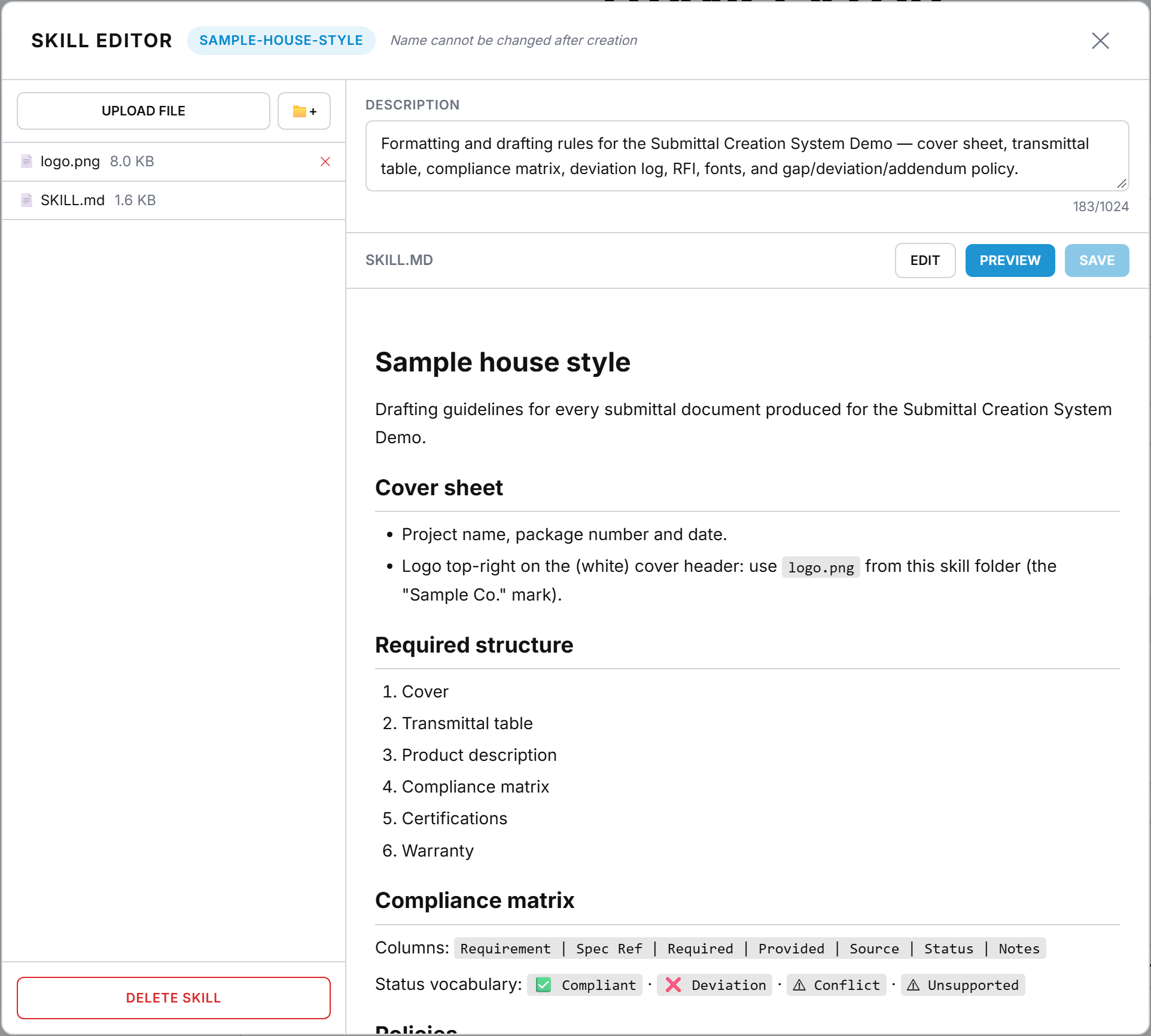
The job also uses a sample skill, sample-house-style. It sets the submittal’s cover sheet and the order of its sections, the columns and status labels of the compliance matrix, and the rules for an addendum that changes a requirement, a product that falls short of one, two sources that disagree, and a value that no source supports.
What the recording shows
- Create a submittal job, attach the folder of 11 sample sources and select the sample-house-style skill.
- Ask for a plan first: "Before building anything, read all the attached sources and give me a short plan/outline for a complete product-data submittal package for the domestic water heaters (Section 22 34 00), taking Addendum 01 into account. List the documents you'll produce (including a compliance matrix, a deviation log and an RFI if needed) and what each will contain. Don't build them yet."
- Then send: "Now build the Product Data Submittal as a Word document, applying our sample-house-style skill. Use parallel sub-agents to read the three spec sections, Addendum 01, the equipment schedule and the manufacturer cut sheet at the same time. Apply Addendum 01 as governing where it revises the spec. Cross-check the proposed SampleHeat HX-500 against the (amended) performance requirements and include a compliance matrix with one row per requirement (Requirement / Spec Ref / Required / Provided / Source / Status / Notes). Also check that the unit fits through the site rigging door. Cite every value back to its source, flag any deviation, flag where two sources disagree, and flag anything the sources don't support."
- Open the Word draft and scroll to the compliance matrix.
- From the draft's list of sources, open the citation of Addendum 01 beside the draft.
The interface and the in-app manual are both fully bilingual, in English and Japanese.
From prototype to production
From October 2025 to February 2026 I built prototypes around the client’s real workflow. One was a drafting pipeline with four agents, for preparation, drafting, web research and summarising web content. Given a section-by-section plan along with manufacturer manuals and websites, it produced bilingual draft contractual documents and flagged missing information for someone to review. For scanned Japanese technical manuals, I compared three approaches: OCR with layout reconstruction, image generation with a critic agent reviewing each translated page, and a creator/reviewer loop with code execution.
The prototypes settled several points in the production design. Routing each page to the right agents worked better than sending every page through the same pipeline. The team needed outputs they could edit. Agent actions also needed cost tracking and citations back to their sources.
Client staff started using the translation pipeline in March 2026, and I worked closely with them through several rounds of feedback. The editing agent was added on 4 June and the contractual-document agent on 15 June, which completed the platform. It has been in production since June 2026.
How it’s built
I designed and developed the platform, working with the client’s team through testing, deployment and ongoing support.
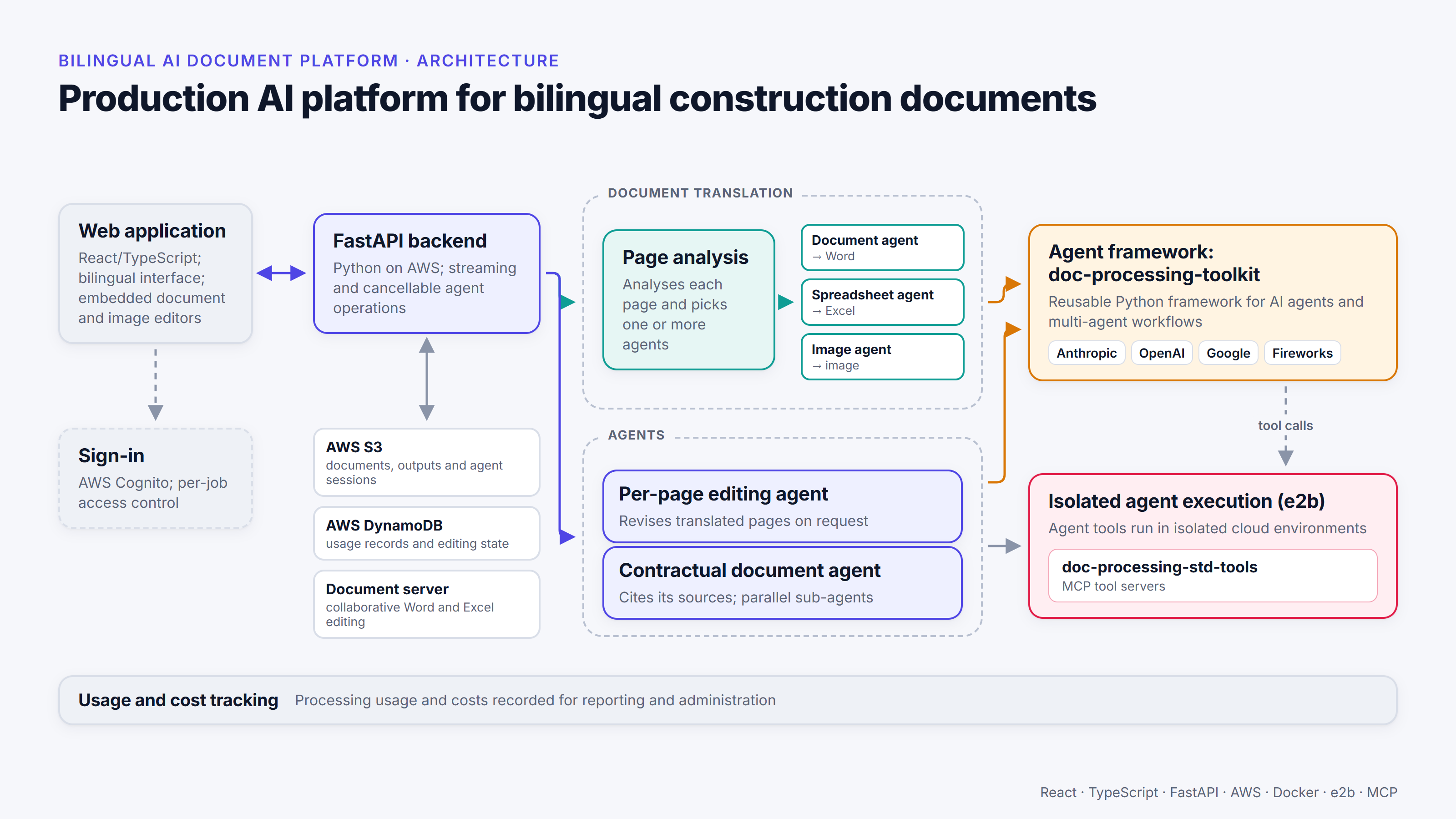
The web app uses React and TypeScript, with a FastAPI backend on AWS. The agents run on doc-processing-toolkit, my Python framework for AI agents and multi-agent workflows, and users can choose between model profiles from Anthropic, OpenAI, Google and Fireworks.
The agents’ tools come from doc-processing-std-tools, my separate package of MCP servers. MCP (the Model Context Protocol) is a standard way of giving AI agents access to tools. On this platform the tools run in isolated e2b cloud sandboxes, and each agent can only use the tools on its own allowlist.
Jobs run on the server, so a job carries on if the user’s browser disconnects, and other users can follow its status. Agent work streams live to the browser and can be cancelled part-way through. The job handling is designed so that an interrupted turn doesn’t leave the job unusable.
Several people can work on a job at once. Access is controlled per job, and co-authoring shows who else is working on it, using DynamoDB leases and S3 compare-and-swap writes. Usage and costs are recorded per page and per agent turn, and an admin dashboard reports them for invoicing and cost tracking.
How quality is checked
Every output has a review status, and reviewers can rate it with a thumbs up or down and a comment. Reprocessing a page applies that feedback, and export can require review first.
I review the system as a whole too. In June 2026 I ran a structured review of a 56-page job, in which a team of AI agents compared every original page with its outputs and classed each issue by cause (the model, the system or both) and by severity. Among other things, it found one document title translated five different ways across the job: a consistency problem that no check on a single page would catch.
The skills, the packaged house rules the agents follow, have their own regression set: 15 test documents that are run again after changes, to catch anything that has got worse. They’re checked by automated screenshot comparison and by a person.
Running it
Running the platform includes working with the team that uses it. I held sessions with them to show how to use it and what it could do beyond their first impressions. On one occasion, a team member doubted that the contractual-document agent could take a particular Excel file, copy one of its sheets and fill it in. I showed them how to create a skill for the task and upload the file as a reference, and with the right instructions the agent did exactly that. Stakeholder engagement, from the team sessions to day-to-day support, was in both Japanese and English.
After launch I also dealt with problems in production. In July 2026 I traced an outage to file-descriptor exhaustion, where the server ran out of file handles. I also found and fixed object-storage listings that were being silently cut off beyond 20,000 objects.
Because the cost records feed the client’s invoices, they need to agree with the provider’s bill. The 6× gap is about a job where they didn’t, and what I changed as a result.
Voice input, real-time steering of running agents and provider-agnostic web search are possible next steps. None of them has been built.
Results
Between March and August 2026, the client’s team ran more than 300 jobs covering over 7,000 pages. That includes the March–May feedback phase, before the full platform went live in June.
I estimate the platform made the team about 4–5 times more productive on most of the tasks it supports: translation, conversational editing and preparing contractual documents. That’s my own estimate; it hasn’t been formally measured.
What I learned
Deciding how to handle each page separately made the later steps simpler, because a spreadsheet, a page of prose and a drawing need different treatment. Editable outputs made review and correction easier for the team. Working in two languages also meant more than translating the AI output: the interface, the manual and support all had to work in Japanese as well as English.
What the team got out of the platform depended as much on the sessions and support as on what the agents could do. In the Excel example above, the team member didn’t expect the agent to manage the task until I showed them how a skill and a reference file made it possible.
I also learned to build the simplest design that meets the requirement. The translation process is well defined, so I built it as a fixed workflow, in which the platform sets the steps and the agents carry them out. That saved time and cost compared with an autonomous agent, which plans its own steps and has a large set of possible actions. Preparing contractual documents varies more from one job to the next, so a more autonomous agent made sense there. Finding where that line falls for each task was one of the more important design decisions.
More from the project