MaintainedMCP · Python
doc-processing-std-tools
A library of MCP servers that gives AI agents tools for files, documents, web research and browser or desktop tasks.
5 min read
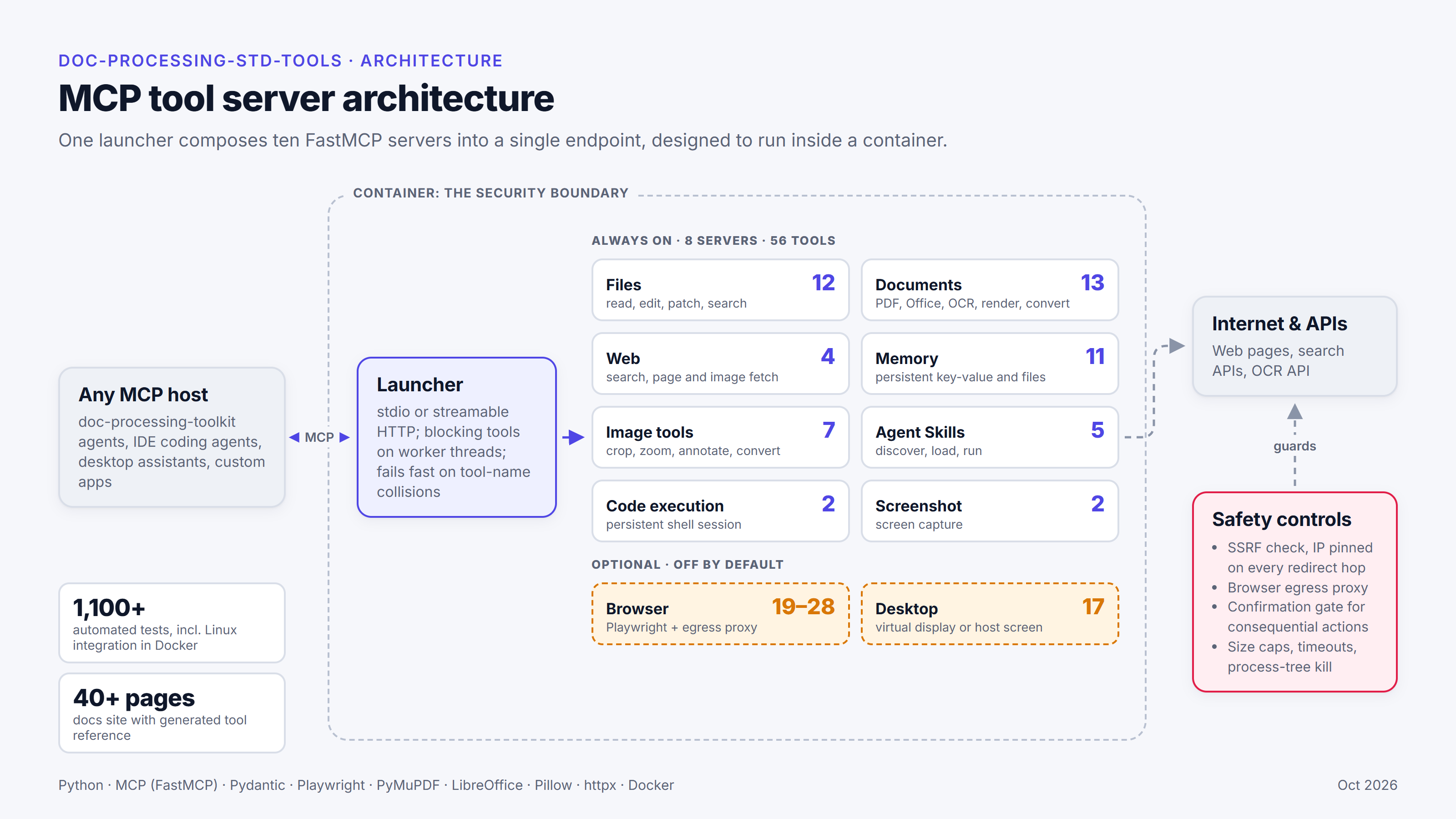
- MCP servers: eight core, plus optional browser and desktop servers
- 10
- tools across the eight core servers, as of v0.6.1 (October 2026)
- 56
- unit tests passing at the v0.6.1 release (October 2026)
- 1,104
- Linux integration tests, run in Docker, passing at the same release
- 149
Technology
- Python
- MCP
- FastMCP
- Pydantic
- Playwright
- PyMuPDF
- LibreOffice
- Pillow
- httpx
- Docker
Why a shared tool library
My early client projects kept needing the same capabilities: reading a PDF, rendering a page for a vision model, searching the web, editing an image or running a command. Each project solved them slightly differently, so I collected them into one Python library. I could have used an off-the-shelf set of tools, but I built my own for the same reasons as my agent framework: each tool does what my projects need, and the library has fewer dependencies, so there’s less that can change under it.
The library is a set of MCP servers. MCP (Model Context Protocol) is an open standard for connecting AI applications to tools. A server publishes its tools, and any MCP-compatible client can discover and call them. That means the same tools work with my agent framework and with other MCP clients, such as coding agents, desktop assistants and custom applications.
Read the documentation. It has configuration guides, an API reference, recipes that combine servers into complete tasks, and a tool reference generated from the code. The documentation is public and the source is private. The library isn’t published on PyPI. Applications install it from a private Git repository at a release tag. If you’re interested in finding out more, connect with me on LinkedIn (see Contact).
Servers and tools
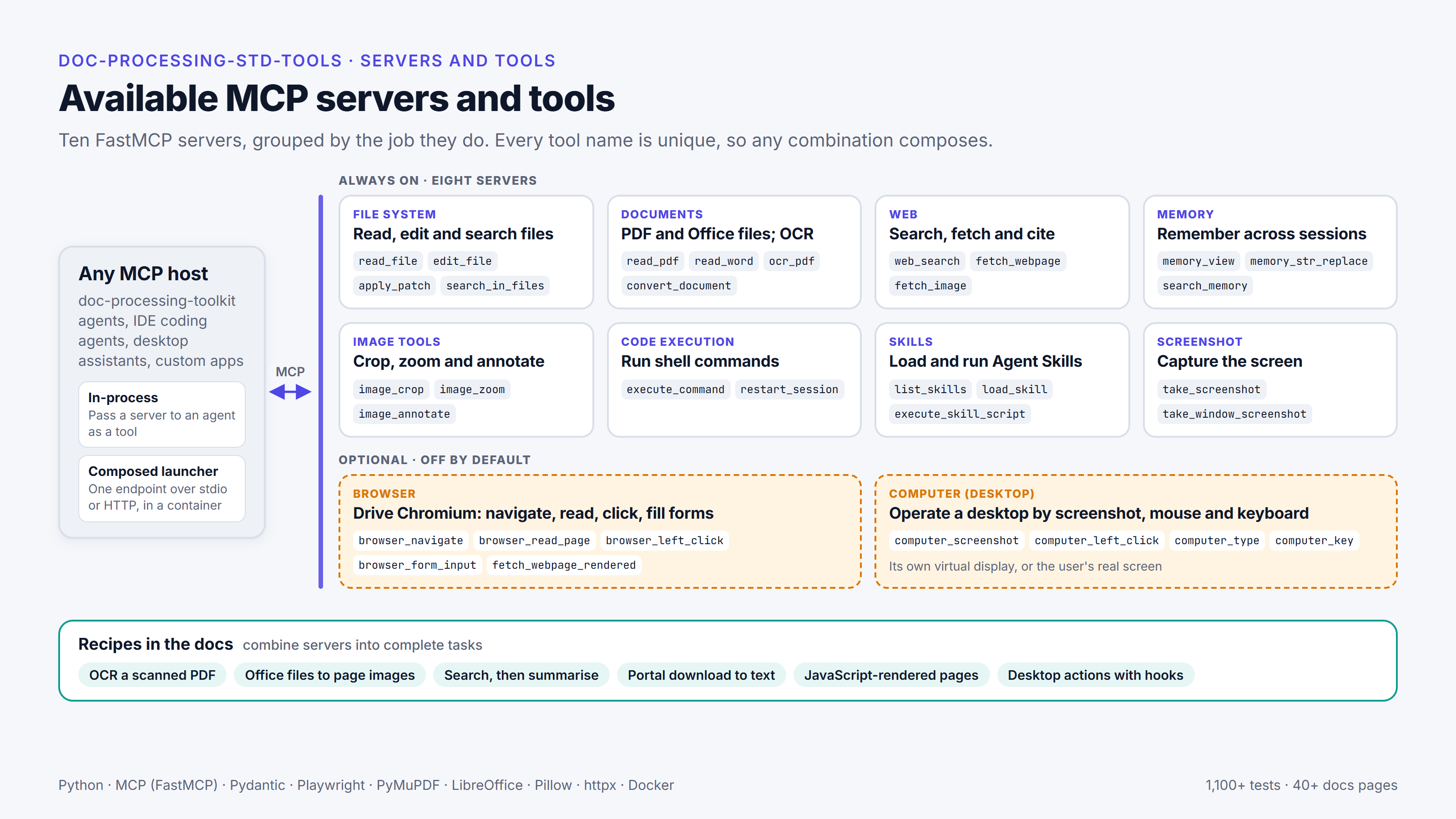
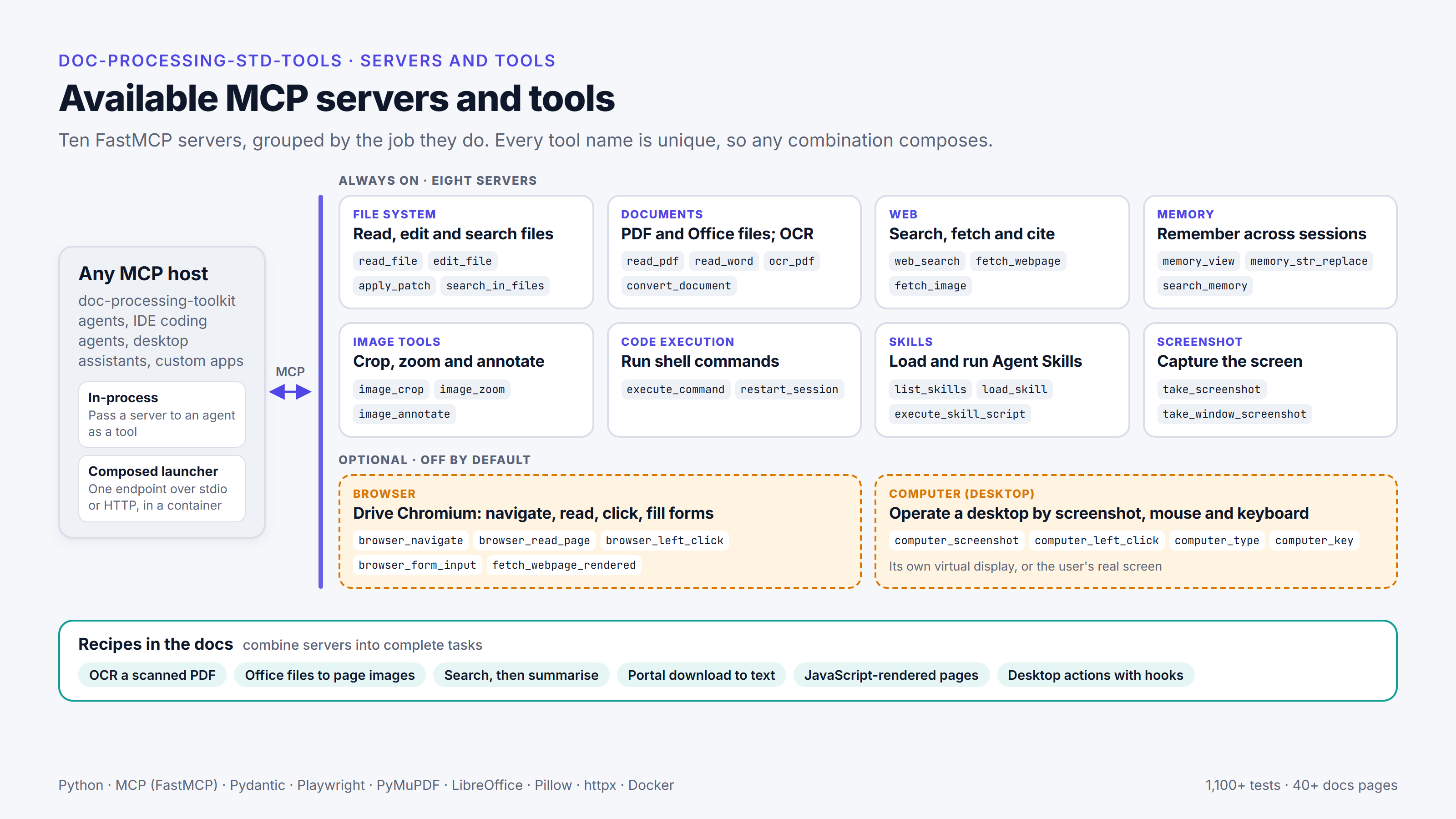
With the library connected, an agent can read a PDF or an Office file, render a page as an image for a vision model, run OCR on a scan, search the web and fetch pages, edit an image, run shell commands and keep a memory that lasts between sessions. With the optional servers turned on, it can also drive a browser or a desktop.
There are ten servers, built with FastMCP. The eight core servers are always on and provide 56 tools between them (as of v0.6.1, October 2026):
- documents and files: a file server; a documents server for PDF, Word, Excel and PowerPoint, OCR, page rendering for vision models and conversion through LibreOffice; image editing; screenshots; and persistent memory;
- web: search and page fetching;
- execution: a shell, and a server for Agent Skills (packaged instructions and scripts that an agent loads when a task needs them).
The other two servers are optional and off by default. One is a Playwright browser. The other is a desktop server that drives either its own virtual display or the user’s real screen.
Each server can be used on its own, including in-process with my framework. A launcher can also combine them into a single MCP endpoint over stdio or streamable HTTP, and it stops with an error if two tools would share a name.
Security model
Browser, shell and desktop access need clear limits, so security is split between the host application and the servers.
A carpenter working on a roof brings the skill: they know how to measure, cut and fix. But how much they can do, and how safely, depends on what they’re given: the right tools for the job, a plan to work from, scaffolding to reach the work, and a safety harness clipped to something solid. The std-tools servers are the agent’s tools: documents and files, the web, a shell. The security model is its safety harness. Consequential actions need approval before they happen, the work runs in an isolated container, and the limits are enforced by the server, outside the agent’s reach, so a mistake doesn’t become a fall.
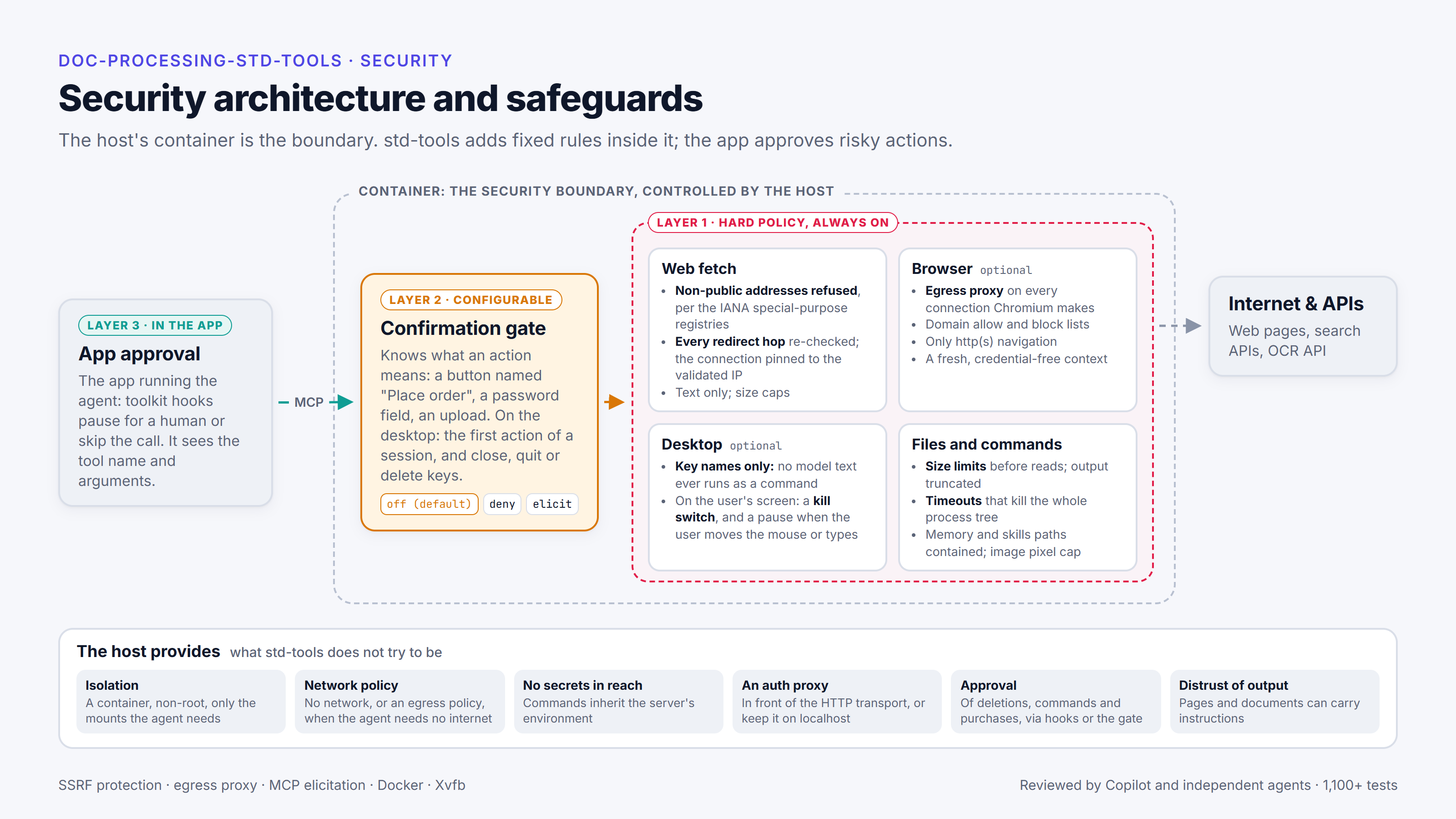
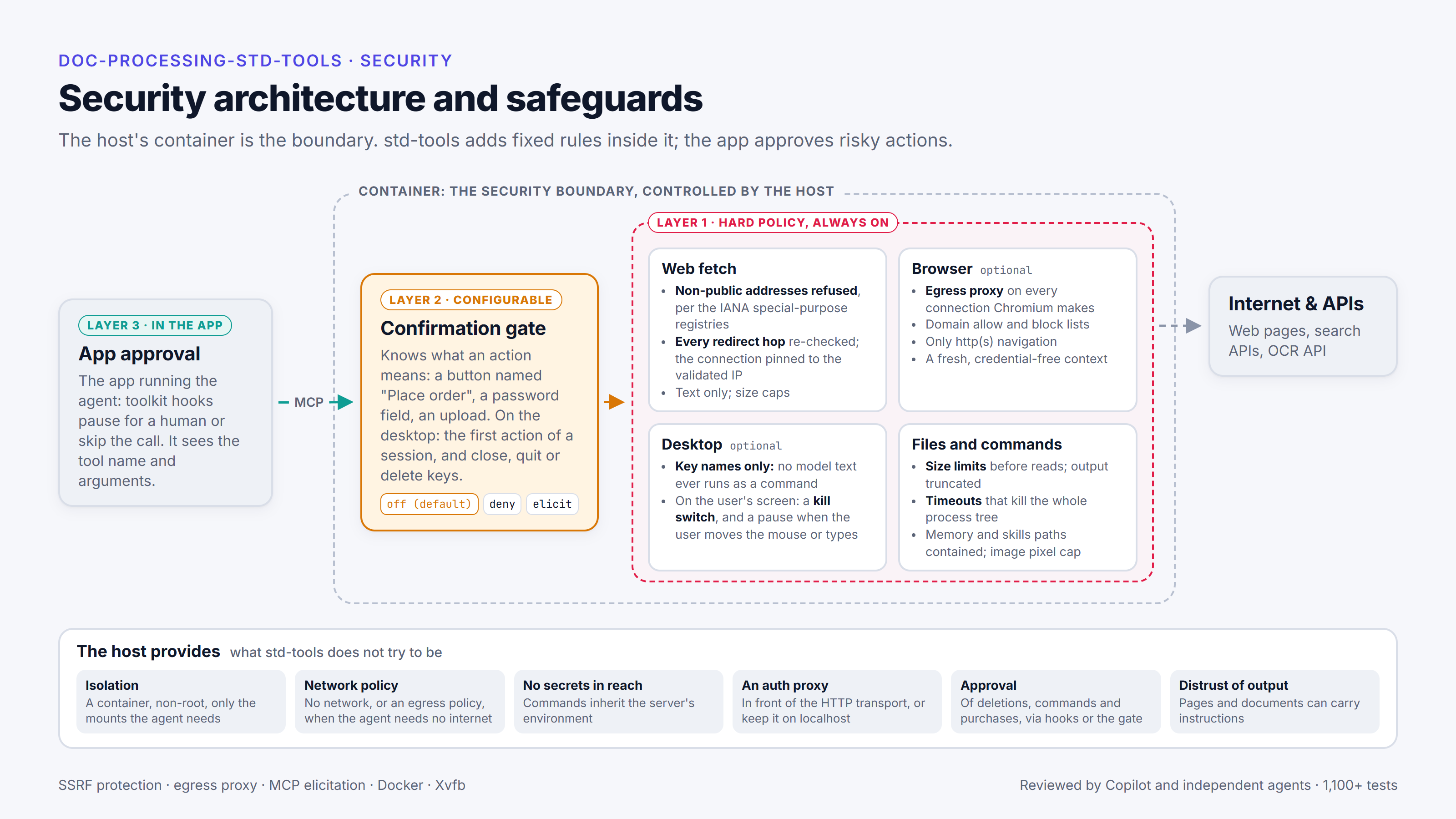
The servers are designed to run inside a container (an isolated sandbox such as Docker) that the host controls, and that container is the security boundary. The documentation sets out what the host needs to provide: isolation, a network policy, keeping secrets out of the agent’s reach, and approval of sensitive actions.
Inside the container, the servers enforce their own checks:
- protection against server-side request forgery (SSRF), in which a fetch is steered to an internal address, by checking every redirect hop against the IANA special-purpose address registries;
- an egress proxy for the browser;
- desktop input restricted to key names, with a kill switch;
- size caps on fetches and files;
- timeouts that kill the whole process tree.
There is also a configurable confirmation gate for consequential actions. It is off by default. When it’s turned on, it either refuses those actions or asks a person through MCP elicitation, the protocol’s way for a server to ask the user for input.
The host application approves the risky actions that remain. In my framework, that’s done with approval hooks that can pause for a person or skip the call. The servers’ checks are meant to work alongside the host’s isolation and permissions, and they don’t cover for a host that leaves those out.
Fixing a gap in the desktop server
One recent release was mostly about security. On its virtual desktop, the desktop server presses keys through xdotool, a Linux program that sends key presses and mouse actions to the screen. xdotool also treats certain words as instructions of its own, and one of them runs another program. A review had found that text sent to the desktop server’s key tool could reach xdotool as those instructions. I restricted the tool’s input to key names and checked the fix live: the old code ran an injected command, and the new code refused it.
The reviews of that change found more. GitHub Copilot, the AI agent that reviews my pull requests, noticed that click modifiers could get past the desktop confirmation gate, and checking that turned up two more routes past it. Independent reviewer agents then found that numeric and Unicode spellings of keys could also get through. A key is usually given by its name, such as F4, but xdotool also accepts a number or a Unicode code for the same key, so alt+0xffc1 is another way of writing alt+F4, which closes the window in focus. Each fix came with tests that fail on the old code, and a final independent review confirmed those routes were closed. That doesn’t prove there are no gaps, but each one found so far is covered by a test, and the code gets more secure with each round.
I write about this way of working in Spec-first, test-first.
Where it’s used
In production, it’s the tool layer inside the sandboxes of an AI document platform I built for a Japan-based client.
It’s also part of the foundation for a personal AI platform I’m building with a co-developer, for agents that run longer tasks and build small apps (working title: AI App Builder). In the current design, std-tools is the shared tool library used by the platform, and the platform’s sandbox provides the isolation for file and code tools.
With my framework, the servers can be passed straight to an agent as tools. This is the example from the quickstart in the documentation:
from doc_processing_toolkit import Agent
from doc_processing_std_tools import document_processing_server, file_system_server

agent = Agent(
    model="claude-sonnet-5",
    instructions="You read documents in the workspace and answer questions about them.",
    tools=[file_system_server, document_processing_server],
)

result = agent.run_sync("List the PDFs in ./reports and summarise the newest one.")
print(result.output)
The file server lets the agent find the PDFs, and the documents server lets it read them.
Other MCP clients can use the servers through the launcher, and the documentation includes a recipe for this. If you’d like a walkthrough or a live demo, get in touch.
More from the project